Short answer: they solve different problems. A Grok Bot is an agent with its own cloud computer that runs jobs on a schedule or when events arrive. A ChatGPT custom GPT is a configured chat assistant, and OpenAI is retiring custom GPTs in favour of plugins, with standard retirement on December 11, 2026. A Claude Skill is a folder of instructions and scripts that Claude loads only when a request needs it. If you want work done while you're away, that's a Grok Bot; if you want Claude to do one kind of task better, that's a Skill.
How we compared them
Everything below comes from each vendor's own documentation, read on October 31, 2026: xAI's Grok Bot docs, OpenAI's help center and Anthropic's Claude platform docs. Where a claim comes from somewhere else, we say so. We compared what each thing is and how it behaves; we did not benchmark answer quality, because that depends far more on the model and your instructions than on the container.
These products change quickly. OpenAI's GPT help article had been updated less than an hour before we read it, so check the linked sources before relying on a specific date or limit.
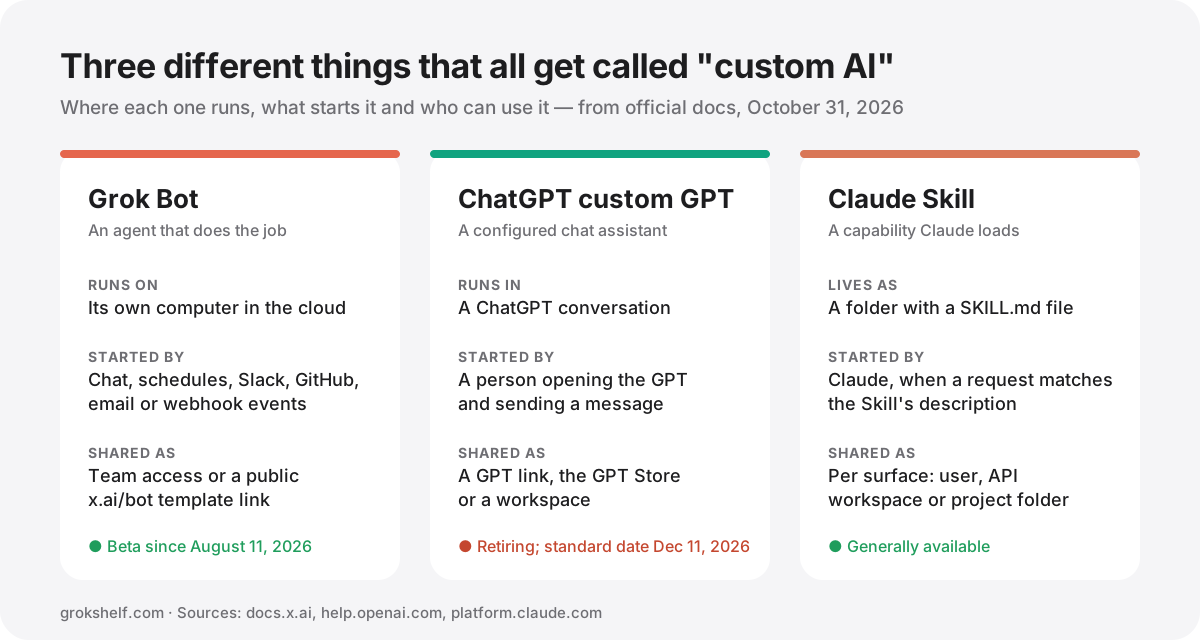
Side-by-side comparison
| Grok Bot | ChatGPT custom GPT | Claude Skill | |
|---|---|---|---|
| What it is | An always-on agent assigned a job | A ChatGPT assistant with its own instructions and files | A reusable capability packaged as a folder |
| Where it runs | Its own computer in the cloud | Inside a ChatGPT conversation | Claude's code-execution environment |
| What starts it | Chat, schedules or events (Slack, GitHub, Linear, Sentry, PagerDuty, email, webhooks) | A person opening it and sending a message | Claude, when a request matches the Skill's description |
| Reusable instructions | Skills, one private library shared by all your Bots | Instructions field, applied to every conversation | The SKILL.md body, loaded only when triggered |
| Reference files | Files and memory on the Bot's computer | Up to 20 knowledge files, 512 MB each | Bundled files read only when needed |
| External tools | Connected apps, logins and a browser | Apps or custom actions (not both at once) | Scripts it can run; network access depends on the surface |
| Runs unattended | Yes, up to 50 routines per Bot | No | No, it runs inside a Claude task |
| Sharing | Team access (same Bot) or a public x.ai/bot template | GPT link, GPT Store or workspace | Per surface: personal, API workspace or project folder |
| Status (Oct 31, 2026) | Beta, launched August 11, 2026 | Being retired; moving to plugins | Generally available |
Grok Bot: an agent with its own computer
xAI launched Grok Bot on August 11, 2026 as a beta, describing it as a team of always-on agents. Each Bot works on a computer in the cloud, signs in to the tools you already use and comes back to you when something needs approval. It's included with SuperGrok plans and with Cursor's Pro, Pro+, Ultra and Teams plans, and its usage is metered separately (xAI announcement).
Two building blocks matter. A skill is a reusable set of instructions for one task, and your skills form one private library shared by all your Bots. A routine tells a Bot when to run: on a schedule such as every weekday at 8 a.m., or when an event arrives from Slack, GitHub, Linear, Sentry, PagerDuty, email or a webhook. A Bot can own up to 50 routines, schedules must be at least five minutes apart and the app keeps the 20 most recent runs of each routine (xAI docs).
Sharing comes in two forms. Inside a team, sharing doesn't make a copy: teammates use the same Bot, as Collaborators who can chat or Managers who can change it, while each person's chat stays private (xAI shared Bots docs). Publicly, creators publish x.ai/bot links with an "Add to Grok Bot" button that gives each person their own copy of the setup. Those public links are what GrokShelf lists and verifies. Creators usually announce them on X — see the launch posts for Bodyguard or Research Bot for typical examples.
ChatGPT custom GPTs: a configured assistant, now being retired
A custom GPT is a version of ChatGPT with a name, instructions, optional knowledge files and capabilities such as web search, image generation, Canvas and Code Interpreter. Instructions define how it behaves in every conversation; knowledge holds reference material, up to 20 files of up to 512 MB each. To reach outside systems, a GPT can use apps or custom actions that call APIs you define, but not both at the same time (OpenAI help center).
The bigger news is the retirement. OpenAI says it plans to retire custom GPTs and help creators move their workflows to plugins, which bundle reusable instructions, reference files and connected apps. New GPT creation and publishing are no longer available on personal accounts (Free, Go, Plus and Pro). Standard retirement is scheduled for December 11, 2026; FedRAMP workspaces and approved deferrals have until February 11, 2027. Existing GPTs keep working until then, and a migrated GPT becomes read-only.
If you have a GPT you rely on, the practical step is to export its instructions and file list now, then follow OpenAI's migration notice for your plan.
Claude Skills: expertise Claude loads on demand
A Claude Skill is a folder built around a SKILL.md file. Its frontmatter needs a name (up to 64 lowercase characters) and a description (up to 1,024 characters) that says what the Skill does and when to use it. Claude keeps only that name and description in context — about 100 tokens per Skill — and reads the full instructions only when a request matches. Bundled scripts run without their code entering the context window, so a Skill can carry large references at little cost (Anthropic docs).
Skills work in the Claude apps, Claude Code and the Claude API, and Anthropic ships ready-made Skills for PowerPoint, Excel, Word and PDF files. They don't sync between surfaces, though: a Skill uploaded in the Claude app is private to that user, one uploaded through the API is available to the whole workspace, and Claude Code reads Skills from personal or project folders. On the API, Skills run without network access. Anthropic's security advice is blunt: only use Skills you wrote yourself or got from Anthropic, because a Skill can run code.
Which one should you use?
Choose a Grok Bot when the work should happen without you starting it: a morning briefing, triaging new issues as they arrive or a weekly competitor check. The scheduling, event triggers and dedicated computer are the point. Our roundup of the best Grok Bots for coding, research and productivity shows what that looks like in practice.
Choose a Claude Skill when you already work in Claude and want one task done the same way every time: your report format, your code-review checklist, your brand voice. It's a capability rather than an assistant, so it suits people who live in Claude Code or the Claude apps.
Avoid starting anything new as a custom GPT. Its own maker is retiring it, so build new assistants on OpenAI's plugins instead, and plan the move for any GPT you depend on.
Notice that all three converge on the same idea: write a job's instructions once and reuse them. A well-written Grok Bot skill and a well-written Claude Skill look much alike, so the effort of writing down how a task should be done carries over even when the platform doesn't.
Before adding any of these, read Using a Grok Bot safely.
References
- xAI: Introducing Grok Bot — August 11, 2026
- xAI docs: Skills, routines and automations
- xAI docs: Shared Bots
- OpenAI Help Center: Creating and editing GPTs — retirement dates and limits, read October 31, 2026
- Anthropic: Agent Skills overview
- Anthropic: Skill authoring best practices
- @liam_fallen on X: Bodyguard launch post — example of a public x.ai/bot share link
- @ArthurMacwaters on X: Research Bot launch post
- GrokShelf: What is a Grok Bot?