Short answer: Grok is free to start. Paid plans on The X Subscription cost $8 a month (Plus), $30 (Premium), $100 (Super) and $200 (Ultra), or about two months less when billed yearly. Grok Bot comes with Premium and up. Team seats cost the same per person. Developers pay for the Grok API by the token instead, starting at $1.25 per million input tokens. Prices are xAI's US list prices, before tax, checked November 15, 2026.
Grok plans and prices
Since October 12, 2026, new customers buy Grok through The X Subscription: one plan that covers Grok, Grok Bot, Cursor and X Premium benefits, with one bill. These are the list prices from xAI's pricing docs. The public page is x.ai/pricing; if a number there is different, trust that page.
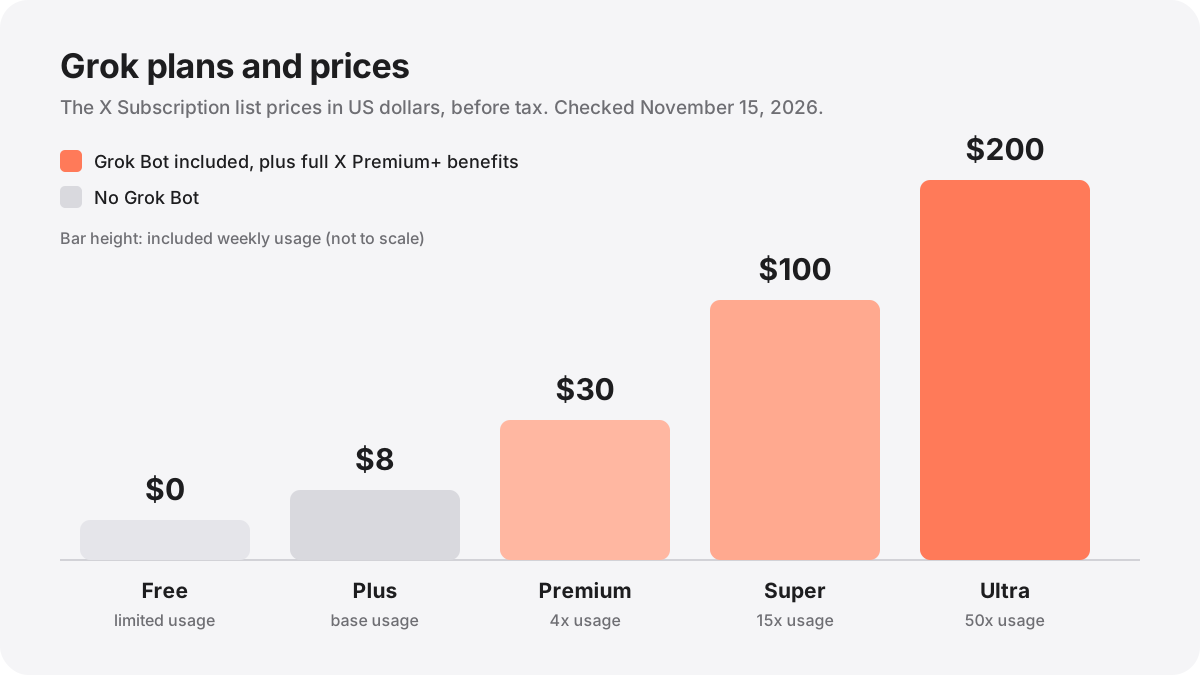
| Plan | Monthly | Yearly | Included usage | Grok Bot | X benefits |
|---|---|---|---|---|---|
| Free | $0 | $0 | Limited | No | Standard X |
| Plus | $8 | $80 ($7/mo) | Base | No | Checkmark, creator tools, fewer ads |
| Premium | $30 | $300 ($25/mo) | 4x | Yes | Full X Premium+ |
| Super | $100 | $1,000 ($84/mo) | 15x | Yes | Full X Premium+ |
| Ultra | $200 | $2,000 ($167/mo) | 50x | Yes | Full X Premium+ |
How much is Grok per month?
Free costs nothing and gives you Grok with limited usage, plus standard X. It is the right place to start if you only ask Grok a question now and then.
Plus is $8 a month ($80 a year). You get the base level of Grok usage, and on X a checkmark, creator tools and fewer ads once you connect your X account. Plus does not include Grok Bot, and it cannot be bought for a team.
Premium is $30 a month ($300 a year, so $25 a month). It is the cheapest plan with Grok Bot, it has four times the usage of Plus, and it includes full X Premium+ benefits. If you pay for X Premium+ today, xAI says to choose Premium or higher to keep those benefits.
Super is $100 a month with 15 times the usage of Plus, and Ultra is $200 a month with 50 times. Both include everything in Premium. The only difference is how much you can use each week, so they are for people who run Grok Bot or Cursor for hours every day.
Yearly billing costs ten times the monthly price, so you get about two months free on every paid plan. Prices are before sales tax, which may be added at checkout where it applies.
What "included usage" means
Every paid seat gets a weekly pool of usage. According to xAI's usage limits page, the pool is shared across Grok, Grok Bot and Cursor for that seat, instead of being split into a separate allowance for each product. Different activities use different amounts: a long Grok Bot job can use far more of the pool than a short chat. Your live usage view shows how much is left and when it resets.
When the pool runs out you have two choices: wait for the weekly reset, or pay for Additional Usage from prepaid credit. Credit is bought with top ups on grok.com/dashboard. Auto top up is off unless you turn it on.
Two controls stop surprise bills. A monthly spending cap sets the most Additional Usage you can use in a calendar month, and Additional Usage stops when the cap is reached even if credit is left. Spend alerts only warn you; they do not stop anything.
One thing is never covered by the pool: third party models in Cursor, such as Claude or GPT. They are paid from prepaid credit from the first request, at API list prices. Grok Bot is different, because it chooses its own model; read does Grok Bot use Claude? for how that works.
Grok Bot pricing
Grok Bot is not a separate subscription. It is included with Premium, Super and Ultra, and xAI's docs say it is available as soon as you subscribe. Its usage comes out of the same weekly pool as Grok and Cursor, so the cheapest way to get it is Premium at $30 a month.
Some accounts can try it first with an in app trial, and a friend's referral can give you two weeks of Premium. The trials, the desktop download and the older Cursor plans that also include Grok Bot are covered in how much Grok Bot costs. Recent changes to the weekly allowance are in Grok Bot usage limits.
Grok for teams and businesses
Team plans are priced per seat at the same prices as the individual plans: $30 for Premium, $100 for Super and $200 for Ultra. Each seat gets the same weekly usage as the matching individual plan, and seats do not share their weekly pools. The team does share one prepaid balance for Additional Usage.
You can mix tiers, for example three Premium seats and one Super seat. Admins invite people from the Members page on the dashboard and pick each person's seat. A new seat added in the middle of a billing period is charged a prorated amount, and removed seats come off at the end of the period. Team seats also include X benefits once each member connects their own X account.
Plus is not available for teams, so the lowest paid team seat is Premium. Enterprise plans are custom and go through xAI's account team. If your X account is a Premium Business account, or an affiliate of one, you can claim The X Subscription on Premium at no extra charge from Premium Hub on X.
Is there a Grok family plan?
No. xAI's subscription docs list individual plans and team plans, and there is no family plan or family discount. An individual plan is for one person and cannot have members.
The closest option is a team plan. If you invite someone from a personal plan, it turns into a team plan and each person who joins becomes a paid seat. Be careful here: the seat menu starts on your own tier, so on Ultra each person you add is another $200 seat unless you pick a lower one. The docs also offer a Free seat when you invite people. Anyone who only wants to chat with Grok can simply use their own Free account.
SuperGrok, X Premium and older plans
If you already pay for SuperGrok, SuperGrok Plus, SuperGrok Heavy, X Premium or a Cursor plan, nothing changes unless you choose to. Switching is optional, and your current plan, price and features continue.
If you do switch, the old subscriptions on the accounts you combine are cancelled at checkout and you get an automatic prorated refund for the unused time. The refund is paid back separately, so the new plan is charged in full at checkout. A switch is permanent and support cannot undo it. Subscriptions bought through the Apple App Store or Google Play have their own steps, which the eligibility page explains.
xAI's pricing docs now list only The X Subscription plans, so check the price of an older plan in your own account settings. When comparing, remember that the new plans include Grok Bot from Premium up and X Premium+ benefits as well.
Grok API pricing
The API is billed separately, per token, to developers who build Grok into their own apps. You do not need a subscription for it. These are the standard rates from xAI's API pricing page for prompts under 200k tokens. Prompts of 200k tokens or more cost double, for the whole request.
| Model | Context | Input / 1M | Cached input / 1M | Output / 1M |
|---|---|---|---|---|
| Grok 4.7 (flagship) | 500k | $2.00 | $0.50 | $6.00 |
| Grok 4.6 | 500k | $2.00 | $0.50 | $6.00 |
| Grok 4.3 | 1M | $1.25 | $0.20 | $2.50 |
| Grok Build 0.1 | 256k | $1.00 | $0.20 | $2.00 |
The Batch API takes 20% off text models for jobs that can wait up to about a day. Server side tools such as web search and code execution cost $5 per thousand calls on top of tokens. Images from Grok Imagine cost $0.02 or $0.04 each. Every model, the long context rates and Grok on Amazon Bedrock and Microsoft Foundry are in our Grok API pricing guide.
Which Grok plan should you choose?
Once you have Grok Bot, the fastest way to see what it can do is to add a Bot someone else already built. Browse Grok Bot templates or the verified shared Grok Bots on GrokShelf.
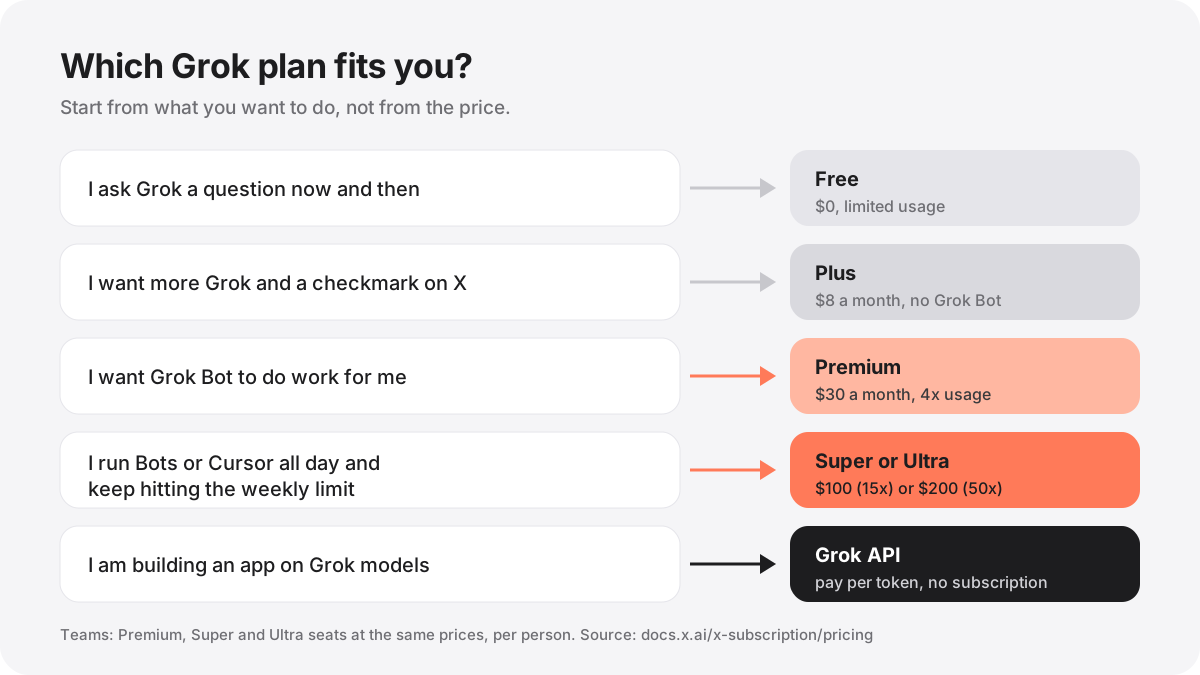
- Start on Free and use Grok for a week. If you rarely hit the limit, you do not need to pay.
- Choose Plus at $8 if you want more Grok and the X checkmark, and do not need Grok Bot.
- Choose Premium at $30 if you want Grok Bot. It is the cheapest plan that includes it, and $25 a month if you pay yearly.
- Move up to Super or Ultra only after you keep running out of weekly usage on Premium. An upgrade on the web starts right away.
- Use the API instead of a plan if you are building your own app or service on Grok models.
How to upgrade, downgrade or cancel
Make changes on the same platform that bills you. On the web, an upgrade starts immediately and the checkout shows how unused time is handled. On iPhone and iPad, Apple handles the change; a downgrade there starts at the next billing cycle, with no refund for the current period unless the law requires one.
To cancel a plan billed on the web, open Billing & invoices on grok.com/dashboard, open the options on your plan and follow the prompts. If you subscribed on X, cancel on X, and if you subscribed through Google Play, cancel in Google Play. Cancelling does not bring back the old subscriptions you combined when you switched.
Before adding any of these, read Using a Grok Bot safely.
References
- xAI docs: The X Subscription pricing — plan prices, usage multiples and team seats, checked November 15, 2026
- x.ai/pricing
- xAI docs: Usage limits
- xAI docs: Spending caps and alerts
- xAI docs: Grok Bot on The X Subscription
- xAI docs: Team plans, seats and invites
- xAI docs: X Premium customers moving to The X Subscription
- xAI docs: Who can combine accounts?
- xAI docs: Upgrade or downgrade
- xAI docs: Cancel your subscription
- xAI docs: API pricing — token, tool, batch and image prices