Short answer: cancel in the same place you pay. If you are on The X Subscription and pay on the web, open Billing & invoices at grok.com/dashboard/billing, open the options on your Current plan card and choose cancel. If you subscribed on X, cancel on X. If you paid through the App Store or Google Play, cancel in your phone's subscription settings, because Apple and Google run that billing and xAI cannot stop it for you. Steps below come from xAI's own help docs, checked November 15, 2026.
First, find out where you pay
Grok can be billed by four different companies: SpaceXSI (the company behind Grok, formerly xAI) on the web, X, Apple and Google. Since October 12, 2026, new customers sign up through The X Subscription, which bundles Grok, Grok Bot, Cursor and X Premium benefits into one plan. Many people still have an older SuperGrok plan, an X Premium plan or a Cursor plan that they never switched.
Each of those is cancelled in a different place, and cancelling in the wrong one does nothing. The quickest way to check is your bank or card statement: the charge names who billed you. An Apple or Google charge means a store subscription. Anything else is a web or X subscription.
If you subscribed on the web but the plan does not show in the app, or the other way round, you probably signed in with a different login. xAI's FAQ says a subscription is tied to the account that bought it, so make sure you use the same Apple, X or Google login everywhere before you assume you paid twice.
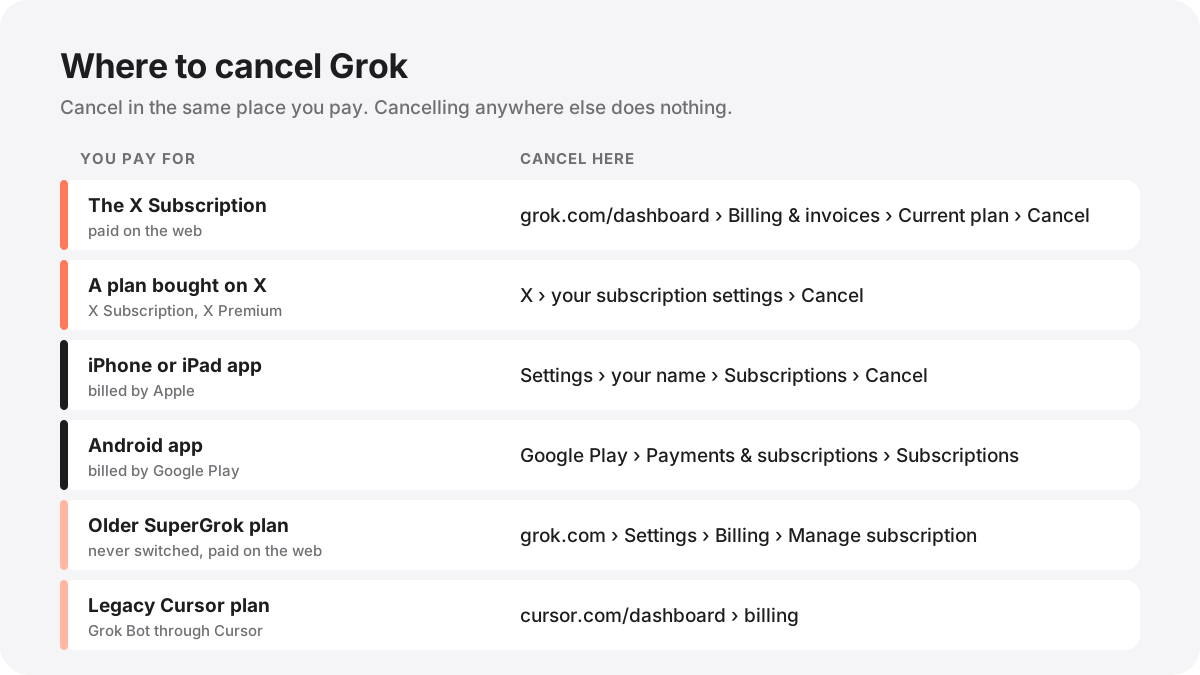
Cancel The X Subscription on the web
This is the plan most new customers have. xAI's cancellation steps are short:
- Go to grok.com/dashboard/billing and sign in with the account that pays.
- On the Current plan card, open the options menu.
- Choose to cancel and follow the prompts to confirm.
You can cancel at any time. Read the confirmation screen before you finish: it is the only place that tells you exactly when your plan ends, and xAI's docs do not publish a general rule for individual plans.
Know this before you cancel. If you combined your Grok, Cursor and X accounts when you switched, that combination is permanent. Cancelling does not separate the accounts and does not bring back your old Cursor, SuperGrok or X Premium subscriptions. If you only want to pay less, you may not need to cancel at all: you can change your plan from the same Current plan card, and a downgrade shows its timing and your next charge before you confirm.
Cancel a plan you bought on X
If you subscribed to The X Subscription from x.com, xAI's docs say to cancel it in X, not on grok.com. Open your subscription settings on X and cancel there.
The same goes for X Premium and X Premium+ bought on X. X, not SpaceXSI, bills those plans and handles any refund that the law requires, through X's refund request form.
Cancel on iPhone or iPad
Apple bills anything you bought inside the iOS app, including Grok, SuperGrok, X Premium and Grok Bot plans. xAI cannot cancel or refund these for you, so do it yourself:
- Open the Settings app and tap your name.
- Tap Subscriptions.
- Choose the Grok, Grok Bot or X subscription and tap Cancel Subscription.
If you started a free trial in the iOS app, cancel before the trial ends. The Grok Bot docs point out that an App Store trial turns into a paid Apple subscription unless you cancel first. Refunds for anything Apple billed go through Apple's refund request page, and Apple decides.
One trap catches people who move to The X Subscription: if you also pay for Cursor through the App Store, that subscription keeps running after you switch, and you can be billed twice. Cancel it in Settings too.
Cancel on Android with Google Play
- Open the Google Play app.
- Tap your profile picture, then Payments & subscriptions, then Subscriptions.
- Choose the Grok, Grok Bot or X subscription and cancel it.
A Google Play subscription belongs to the account that bought it. xAI's mobile docs note that if you are signed in to a different Grok Bot account, changing the plan from the app fails with a general error. Sign in to the account that owns it, or cancel from Google Play directly.
If you switched to The X Subscription, check Google Play afterwards. Grok, Grok Bot or X Premium bought there may still be set to renew, and you have to cancel it yourself.
Cancel an older SuperGrok plan
If you never switched, your SuperGrok, SuperGrok Plus or SuperGrok Heavy plan carries on as before. xAI's Grok FAQ says to manage a web subscription at grok.com/?_s=billing while logged in, or from Settings and then Billing on grok.com. From there you can change plan, update your card or cancel.
If the Manage Subscription button does nothing, the FAQ says an ad blocker or another browser extension is the usual cause. Try a private window or a different browser. If it still will not open, contact support and they can pass the cancellation to the billing team.
Grok Bot: there is no separate plan
Grok Bot does not have its own subscription to cancel. On The X Subscription it comes with Premium, Super and Ultra, so it ends when you cancel or move down to Plus or Free, which do not include it. On a legacy Cursor plan, Grok Bot is billed by Cursor and you manage it from your Cursor dashboard.
If you linked SuperGrok or X Premium+ to Cursor for Grok Bot, the two subscriptions bill separately. The Grok Bot FAQ says buying one does not cancel the other, so cancel each one where it is billed. The link itself is permanent and cannot be moved to another account.
What happens to your Bots? xAI's docs do not say how long Bots, chats or files on the Bot's computer are kept after Grok Bot access ends. The troubleshooting docs say Bots and chats belong to your account, but to be safe, download any Pages, files or results you want to keep before you cancel.
Cancel a Grok Bot free trial
The free trial you start on the web or desktop is a usage credit with a 7 day window. It never turns into a paid plan, so you do not have to cancel it to avoid a charge. If you want to end it early, choose Cancel Trial in Settings, then Usage & Billing on desktop, or Settings, then Usage on iPhone and Android. That removes any credit left, and you cannot start the trial again.
The App Store trial in the iOS app is different, as covered above: Apple runs it, and it becomes a paid subscription unless you cancel in Settings before it ends. Android has no trial inside the app.
Team plans
Admins cancel a team plan from the same Current plan card on grok.com/dashboard; only admins who manage billing can see that page. According to xAI, a cancelled seat stays active until the end of the billing period, and reassigning it before then keeps it active. While the whole plan is set to cancel, you cannot add members. Enterprise customers cancel through their account team.
Refunds
Refunds follow the same rule as cancelling: whoever billed you decides. Here is what xAI's docs say for each case.
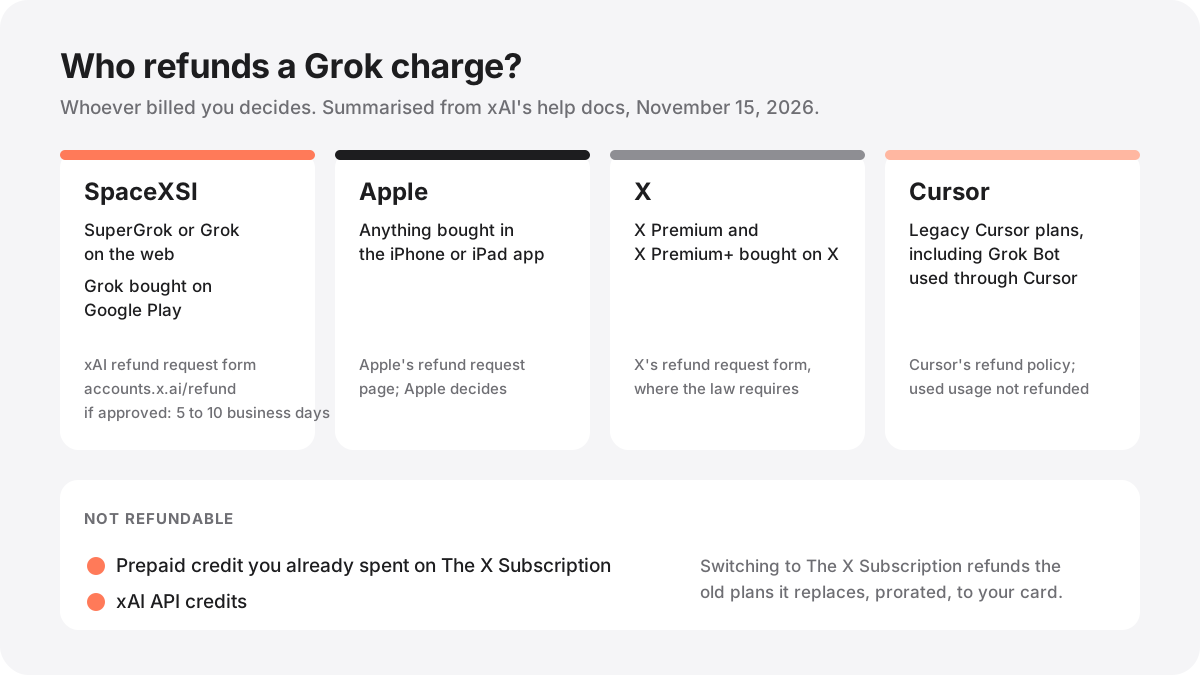
| Where you paid | Who handles the refund |
|---|---|
| SuperGrok or Grok on the web | SpaceXSI, through the xAI refund request form. Approved refunds usually reach your card in 5 to 10 business days, per the Grok FAQ. |
| The X Subscription on the web | Charges are reviewed from your billing dashboard; if one looks wrong, contact support. Prepaid credit you already spent is not refundable. |
| App Store (iPhone, iPad) | Apple, through its refund request page. |
| Google Play: Grok or SuperGrok | SpaceXSI, through the same xAI refund form, according to the Grok FAQ. |
| Google Play: Grok Bot app plan | Google Play's refund support, according to the Grok Bot mobile docs. |
| X Premium or X Premium+ | X, through X's refund request form, where required by law. |
| Legacy Cursor plan | Cursor's refund policy. Usage Grok Bot already consumed is not refundable. |
| xAI API credits | Not refundable. |
When you switch to The X Subscription, the old plans it replaces are cancelled for you with a prorated refund for unused time, sent back to the original card rather than added as credit. That refund applies to the switch, not to cancelling The X Subscription later.
Stop extra charges without cancelling
Some people want to cancel because of a surprise bill, not the plan itself. On The X Subscription, usage past your weekly pool can be paid from prepaid credit. To stop that, open Billing & invoices, turn off automatic top ups under Additional usage credits, or set a monthly additional usage limit. On a legacy Cursor plan, turn off on demand usage or set a monthly limit. A cap does not stop a Bot that is already running, so a task can go slightly past it.
If a large charge surprised you, the Grok FAQ notes it is often a yearly SuperGrok Heavy renewal rather than API usage. Check the purchase date in your subscription history before you dispute it.
Deleting your account is not the same as cancelling
You can delete your xAI account at accounts.x.ai, which also removes any API access on the same account. Cancel your subscription first. Apple and Google bill you separately from your xAI account, so a store subscription keeps renewing until you cancel it in the store.
If your account was hacked and someone changed the email, contact support straight away. The FAQ says support can cancel the subscription on a compromised account. For billing and cancellation questions about Grok Bot, the docs give [[email protected]](mailto:[email protected]) as the address to write to, from the email on your account.
Common questions
Can I cancel Grok at any time? Yes. xAI's docs say you can cancel a web plan at any time. Store plans can be cancelled any time in Apple or Google settings.
Will I lose X Premium benefits? If your X benefits come from The X Subscription, they end with it, because Premium, Super and Ultra are what include full X Premium+ benefits.
Can I undo a switch to The X Subscription by cancelling? No. A completed switch is permanent, and support cannot undo it.
Is there a cheaper option than cancelling? Grok has a free plan, and Plus costs $8 a month. See Grok pricing for every plan, or what Grok Bot costs if Grok Bot is the reason you pay.
Before adding any of these, read Using a Grok Bot safely.
References
- xAI docs: Cancel your subscription — checked November 15, 2026
- xAI docs: Managing The X Subscription
- xAI docs: Invoices & Refunds
- xAI docs: Cursor subscriptions bought through the App Store
- xAI docs: Google Play subscriptions
- xAI docs: Grok Bot on The X Subscription
- xAI docs: Grok Help & FAQ — SuperGrok billing, refunds and account questions
- xAI docs: Grok Bot FAQ — trials, refunds and linked plans
- xAI docs: Grok Bot for Mobile — App Store and Google Play subscriptions
- Apple: Request a refund
- X: Refund request form