Tesla's update 2026.38.6 removes the beta label from Grok worldwide. Here is what Grok can do in a Tesla today, which cars get it, why older Intel cars may be next, and what is still missing.
In short: Tesla's software update 2026.38.6, rolling out since early November 2026, removes the beta label from Grok in every market · Grok in a Tesla can now set navigation, make calls, play music, change the climate and seat heating, find settings and answer questions about the car · it still needs a car with an AMD Ryzen computer and Premium Connectivity or WiFi · update 2026.38 quietly added Grok files to older Intel Model 3 and Model Y, but Tesla has not switched them on · text messages and Full Self Driving commands are the next features on the list.
Grok arrived in Tesla cars in July 2025 as a beta that could chat but could not touch the car. Sixteen months and a long run of software updates later, Tesla has dropped the beta tag. That makes this a good moment to set out what the assistant actually does today, which cars have it, and what owners of older cars can expect. Everything below comes from Tesla's release notes and owner's manual, as reported by the Tesla software sites that track them, and we say where something is only a hint or a forecast.
What changed in update 2026.38.6
The change itself is small on screen. According to the release notes for 2026.38.6.2, tracked by Not a Tesla App, "Tesla has removed the beta label from Grok" on the Model S, 3, X, Y and Cybertruck, and the change applies worldwide. Drive Tesla Canada reported it on November 2, and Tesla Oracle said on November 4 that 2026.38.6 had gone into wide release, with Grok out of beta and Latvian language support added.
No new Grok feature arrived with the label change. What it signals is that Tesla now treats Grok as the car's main voice assistant rather than an experiment. That fits with how much more Grok has been able to do since the Summer Update added calls, music and climate.
How Grok got here
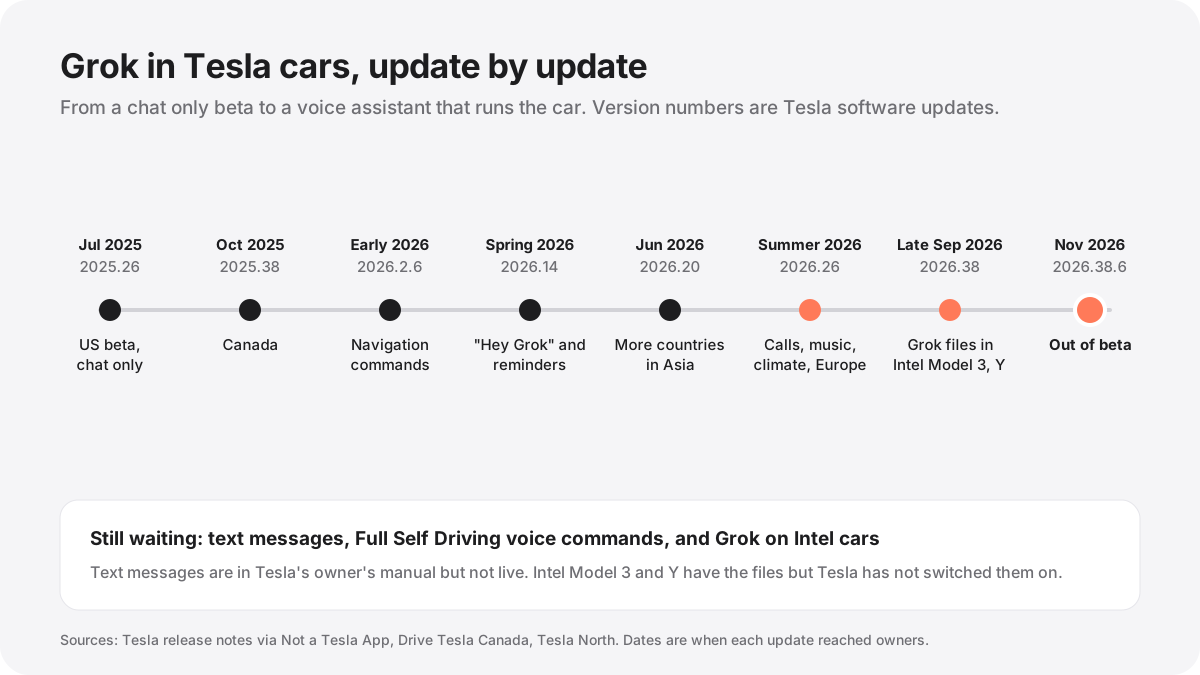
Tesla started rolling out update 2025.26 on July 12, 2025, days after Elon Musk unveiled Grok 4 and said it would reach cars "next week at the latest." That first version was limited to the United States and to cars with AMD Ryzen computers. You opened it from the App Launcher or by holding the voice button on the steering wheel, and it could not control anything in the car.
Canada followed in October 2025. Navigation was the first real job: in update 2026.2.6 Grok learned to search for places and add or remove stops. The Spring 2026 update, version 2026.14, added the hands free "Hey Grok" wake word and location based reminders, so you can ask the car to remind you about something when you get home or to work. In June, update 2026.20 brought Grok to Chile, Malaysia, the Philippines, Thailand, Singapore and Hong Kong. In July Tesla said the Summer Update would bring it to all of Europe and more of Asia, including India.
The biggest step was that Summer Update, 2026.26. Its release notes read: "Grok can now make phone calls, play music, adjust climate, and search the Controls panel. Ask Grok about your Tesla or what was included in the latest software update." From that point Grok stopped being a chatbot in the dashboard and became the way you talk to the car.
What you can ask Grok in a Tesla today
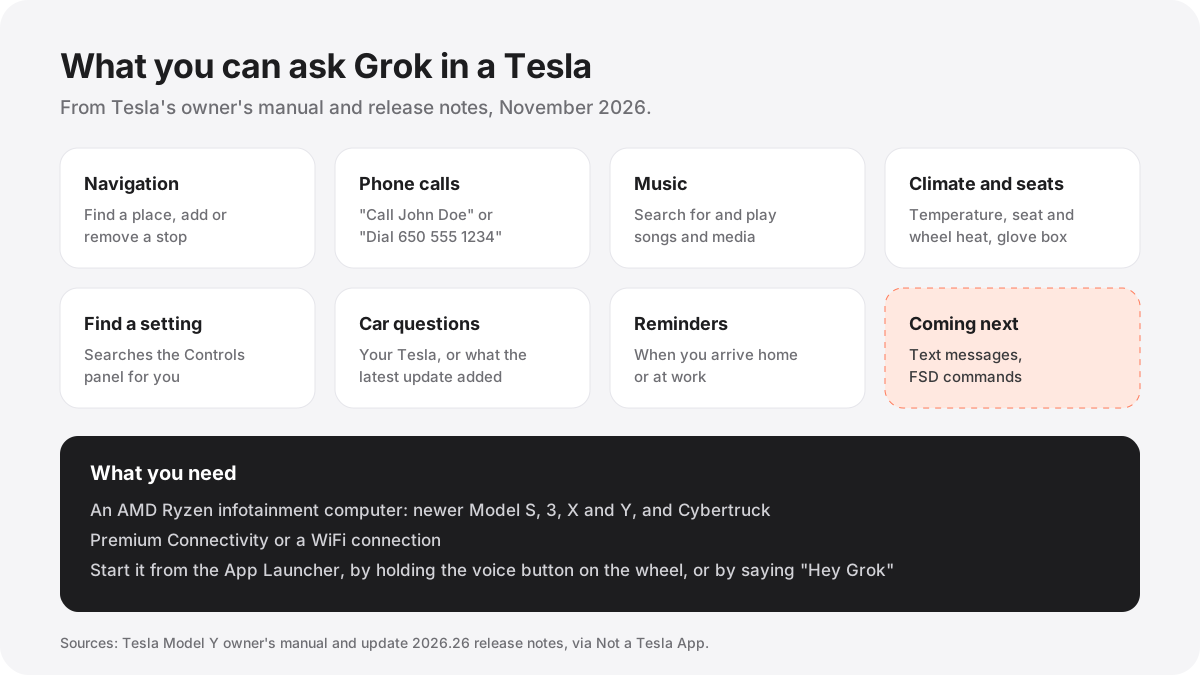
Tesla's Model Y owner's manual, quoted by Not a Tesla App in September, lists what Grok does when it is set to the Assistant personality:
Navigation: search for a location, or add and remove a destination on your route. Phone calls: call a contact or dial a number, for example "Call John Doe." Media: search for and play music and other media. Controls panel search: ask about your Tesla and Grok takes you to the right setting. Vehicle commands: climate temperature, seat heating and cooling, steering wheel heating and the glove box. Vehicle questions: ask how something on the car works. Location based reminders and the "Hey Grok" wake word can each be switched on or off under Grok, then Settings.
What Grok cannot do yet matters as much. It does not drive the car: there are no Full Self Driving voice commands. It cannot send text messages. And the vehicle commands cover the common controls, not every switch in the car, so some settings still need a tap on the screen.
Which Teslas get Grok
Grok needs two things. The first is an AMD Ryzen infotainment computer, which the release notes list for the newer Model S, Model 3, newer Model X, Model Y and Cybertruck. The second is a data connection: Premium Connectivity or WiFi. Tesla's notes also say that conversations "are anonymous to Tesla and not associated with your vehicle." The release notes list those two requirements and do not mention a separate Grok subscription.
It is now available in most of Tesla's markets: the United States and Canada, Europe, Australia and New Zealand, and a growing list in Asia. If the Grok app is missing from your App Launcher, check the computer first. Most cars without Grok today are older ones built on Intel.
Will older Intel cars get Grok?
This is the most searched question, and there is real news on it, though no promise. Model 3 and Model Y built with the older Intel Atom computer, mainly cars from 2017 to 2019, have never had Grok. On October 31, Not a Tesla App reported that update 2026.38, which began rolling out in late September, added the Grok files to Intel Model 3 and Model Y software for the first time.
A Model 3 owner with root access then turned Grok on by flipping a feature flag, and a video shared on X showed it running with what the poster called "surprisingly solid framerates." The well known Tesla hacker @greentheonly confirmed the change: "the Intel Model 3 did get them added in 2026.38 so enabling it looks feasible indeed." He also said the files are not present on Intel Model S and Model X.
So for an Intel Model 3 or Model Y, the code is already in the car and Grok runs mostly in the cloud, which makes the old processor less of a barrier. Not a Tesla App suggested Tesla might switch it on with this year's Holiday Update. That is a guess, not a Tesla statement, and Tesla has said nothing in public. Owners of Intel Model S and Model X should not expect it soon, because their cars do not even have the files. Flipping the feature flag yourself is not an option for most owners: it needs root access to the car, which Tesla does not support.
What is coming next
Text messages are the clearest next step, because Tesla has already written them up. The same owner's manual lists: "Text messaging: Ask Grok to send a text message to a contact or phone number (for example, \"Text Mom saying on my way\")." Not a Tesla App noted in September that this was not working yet, which means the manual got ahead of the software.
Full Self Driving commands are the other gap. Not a Tesla App has expected them since the Summer Update, and it wrote on October 31 that FSD commands and text messaging are both "on the way." Neither Tesla nor Musk has given a date, so treat both as coming, not shipped.
Grok in your car and Grok Bot
The car's Grok is not the same as Grok Bot, SpaceX's agent product, even though both use the Grok name. Grok in the car is a voice assistant for driving. Grok Bot is a set of agents with their own computer that do work for you. The two are starting to meet: when Grok Bot on Mac gained access to Messages, Mail and Notes on November 12, Evan Bacon, who leads frontend work for Grok at SpaceXSI, said you could reach it from Grok Bot on your phone, the web or the Grok Bot client in a Tesla. We covered that in Grok Bot on Mac.
Grok is also spreading across the rest of the Musk group. Musk said in June 2025 that the Optimus V3 robot already uses Grok for voice. And on August 24, 2026, SpaceX's AI account said Starlink uses Grok Voice to resolve over 15,000 support and sales calls a day. Those are the company's own figures, not independent ones. Our Grok timeline tracks each of these.
Questions owners ask
Is Grok in Tesla free? Tesla's release notes ask for Premium Connectivity or WiFi and do not mention a Grok subscription. Premium Connectivity is a Tesla subscription; on WiFi alone, Grok works when the car is connected. For Grok on your phone or computer, the plans and prices are in Grok pricing.
How do I start Grok in my Tesla? Open Grok from the App Launcher, hold the voice button on the steering wheel, or say "Hey Grok" if the wake word is on in Grok, then Settings.
Why don't I have Grok? The usual reasons are an Intel computer, no Premium Connectivity or WiFi, a market where it has not launched, or software older than the update that brought it to your region.
Can Grok drive my Tesla? No. It can set your destination, but there are no Full Self Driving voice commands yet.
If you want to see what Grok can do outside the car, start with what a Grok Bot is or browse verified shared Grok Bots that other people have built.
Sources
- Not a Tesla App: 2026.38.6.2 release notes, Grok beta label removed ↗
- Drive Tesla Canada: Tesla could soon bring Grok to older Intel Model 3 and Model Y (November 2, 2026) ↗
- Tesla Oracle: update 2026.38.6 goes into wide release, Grok comes out of beta (November 4, 2026) ↗
- Not a Tesla App: Tesla adds Grok files to Intel cars in update 2026.38 (October 31, 2026) ↗
- Not a Tesla App: Tesla to add Grok text messaging, owner's manual (September 12, 2026) ↗
- Not a Tesla App: 2026.26.6.3 release notes, Grok calls, music and climate ↗
- Not a Tesla App: Grok expanding to all of Europe and more of Asia (July 22, 2026) ↗
- Not a Tesla App: Grok in more countries with update 2026.20 (June 4, 2026) ↗
- Tesla North: update 2025.26 brings Grok to Tesla cars (July 12, 2025) ↗
- Teslarati: Musk confirms Optimus V3 uses Grok voice (June 25, 2025) ↗
- SpaceXSI on X: Starlink uses Grok Voice for over 15,000 calls a day (August 24, 2026) ↗