On November 14, 2026 the Grok Imagine team said image and video creation now lives inside Grok, and Grok called it one place to create, build and work. Here is what changed, how to create now, what still works and what was left unsaid.
In short: On November 14, 2026, the Grok Imagine account on X posted "Image and video creation now live in Grok. Just open Grok and start creating." · Grok's own account followed, describing more SpaceX Super Intelligence products coming together so people have one place to create, build and work · this is the first official word after the Imagine tab vanished for many users on November 12 and 13 · creation now starts from the normal chat box in Image or Video mode · no new prices, limits, models or rollout details were announced, and nothing says Imagine is shutting down.
For two days, people who opened Grok to make a picture or a short video found the Imagine tab gone and no explanation. On Friday, November 14, the company finally said something. The answer is short: Imagine has not been switched off, it has been folded into Grok itself. Below is exactly what was said, what it means for the way you create, which features carry over, and the questions the announcement leaves open. We mark clearly where we are giving our own reading rather than reporting.
What was announced
The first post came from the Grok Imagine account on X: "Image and video creation now live in Grok. Just open Grok and start creating." It is two sentences long and links to nothing else, but it confirms the change users had been describing since Wednesday night.
Shortly after, the Grok account added the wider picture. According to Tesla North's report on the posts, Grok said more products from SpaceX Super Intelligence, the AI group formerly known as xAI, are being brought together so users have "one place to create, build and work." In other words, the Imagine change is not a one off. It is the first visible step in turning Grok into a single app for everything the group makes.
Neither post mentions the staff cuts that The Information reported a day earlier, and neither gives a date for further changes. There was no blog post on x.ai and no entry in the release notes when we checked.
Why this settles the missing tab question
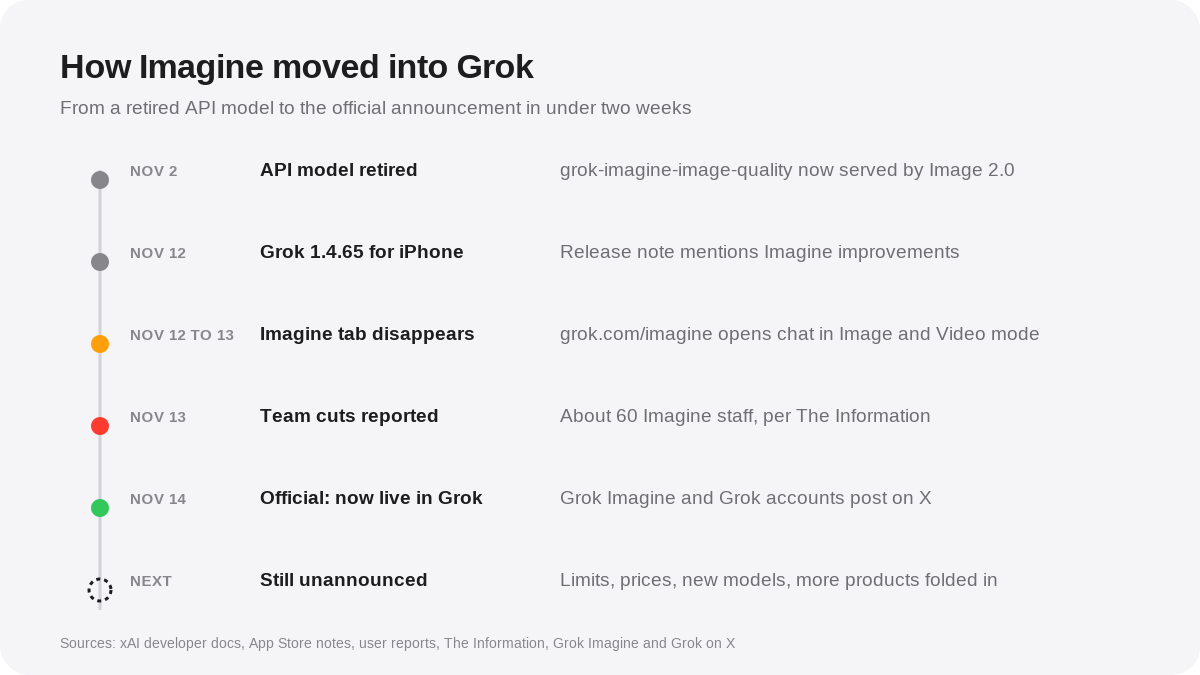
When the Imagine tab disappeared, there were three possible explanations: a bug, a test on some accounts, or a deliberate redesign. We covered the reports in Grok Imagine after the layoffs: where the Imagine tab went, and at the time we could only say a deliberate move looked likely. The November 14 posts make it official. The separate tab is not coming back as it was, because image and video are now meant to be part of the main Grok experience.
That also explains what people saw on their screens. On affected accounts the sidebar shows Library, Grok Bot and Projects, and typing grok.com/imagine opens the regular chat with Image and Video mode already selected. Those are not glitches. They are the new layout.
How to create images and video in Grok now
The workflow is close to what you used before; it simply starts in a different place.
Open a normal chat. Go to grok.com or open the Grok app on iPhone or Android. You do not need a special page any more.
Pick Image or Video mode. Choose the mode in the chat box before you type your prompt. If you still have a bookmark to grok.com/imagine, it now takes you to the chat in this mode, so old links keep working.
Start from a template if you like. RoboRhythms reports that the mode opens with 17 ready made templates, such as Background removal and Character sprite. They are a quick way to see what the tools can do without writing a long prompt.
Find your earlier work in Library. Past creations should still be stored with your account. Some users saw warning triangles in place of saved items from November 13, most often in Chrome, and some of those items came back hours later on their own. Do not delete anything while the change settles, and avoid repeatedly refreshing a half loaded Saved page, which can make images look as if they vanished.
Update the app. Grok 1.4.65 for iPhone shipped on November 12 with a note about Imagine improvements, and an Android update followed on November 14. If something looks broken, updating is the first step.
What carries over from Imagine
Nothing announced on November 14 removes a feature, so the tools xAI launched this year should still be there, now reached through chat.
Imagine Image 2.0. Launched on August 7 as the Quality Mode, it was built for design work: sharp small text, layouts that hold together, and editing tools such as a magic wand for one region, background removal, smart resize and up to five reference images in one request. xAI said it ranked second in the world on the Arena leaderboards for text to image and image editing.
Imagine Video 1.5. On July 31, xAI added image and voice references, video from a prompt alone and native 1080p output. In xAI's developer documentation, the API accepts up to 14 reference images and three voice references per request. Using your own recorded voice as a reference is limited to trusted partners on request, while preset voices are more widely available.
The API. For developers nothing changed on November 14. The image model grok-imagine-image-2.0 is live for generation and editing, and video generation is still listed in the docs. The only recent change came earlier: the grok-imagine-image-quality model was retired on November 2, with requests now served by Image 2.0 at its low quality setting. If you build on Imagine, keep watching the developer docs, where xAI has announced past retirements with notice.
What the announcement did not say
The two posts were short, and they left a lot open. Here is what was not announced.
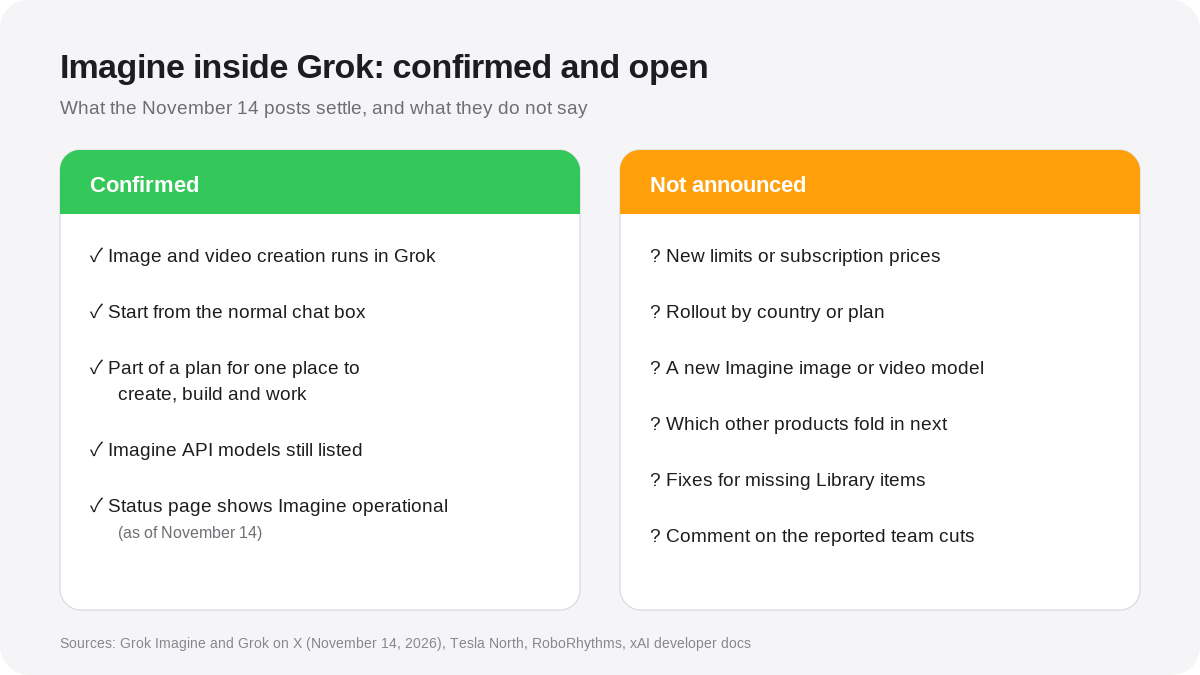
No new limits or prices. The posts do not say whether image and video generations count against the same limits as chat, or whether plans change. Grok Bot limits were tightened earlier this month, which we covered in Grok Bot usage limits and serving costs, so it is a fair question, but there is no answer yet.
No rollout details. We do not know whether every account and every country has the new layout. If you still see the old Imagine tab, you are probably on an older version or have not been moved yet.
No new model. The change is about where you create, not what creates it. No new image or video model was announced.
No word on the team. The Information reported on November 13 that about 60 people were cut from the Grok Imagine team, leaving a handful to keep it running. The November 14 posts do not mention this, and SpaceX has not confirmed the figure.
Why combine everything into Grok
The Grok account's own words point to the reason: one place to create, build and work. Over the past few months Grok has grown into several products. There is the chat, Grok Bot for agents and teams, Projects, Grok Build for coding and Imagine for media. Keeping each in its own corner makes the app harder to use and harder to maintain.
Our reading, not something the company has said: folding Imagine into chat also suits a smaller team. One interface is cheaper to run than two, and it lets image and video tools be called from a conversation or by Grok Bot rather than living as a separate creative app. It fits the wider shift toward coding and agents that the layoff report described. The open question is whether Imagine keeps improving as its own product or becomes mainly a tool other parts of Grok call on.
What to watch next
Which product folds in next. Grok's post spoke about more products coming together, not just Imagine. Grok Build and Grok Bot are the obvious candidates to look for.
Limits and plans. If image and video now share a space with chat, any change to how generations are counted will show up in the plan pages and in the app.
Library fixes. Missing or broken saved items are the most common complaint. A fix in an app update would be the clearest sign the move is finished.
Developer notices. Any change to the Imagine models will appear in xAI's developer docs first, as the November 2 retirement did.
Questions people are asking
Is Grok Imagine shut down? No. The official post says image and video creation is now live in Grok. It has moved, not ended.
Where is the Imagine tab? It has been replaced by Image and Video mode in the main chat. grok.com/imagine now opens that mode directly.
Do I need a new subscription? Nothing announced says so. No prices or plans changed on November 14.
Are my old creations gone? There is no sign of that. Check Library, and if items show warning icons, wait rather than deleting anything.
Can I still use Imagine through the API? Yes. The image and video models are still listed in xAI's developer docs.
Is Imagine not working for you? Our guide Grok Imagine not working? Fixes for the most common problems covers weekly limits, 480p videos, moderated results and missing Library items.
We will update this post when the company shares limits, prices or the next product to join Grok. For every dated change, see the Grok timeline.
Sources
- Grok Imagine on X: Image and video creation now live in Grok (November 14, 2026) ↗
- Grok on X: one place to create, build and work (November 14, 2026) ↗
- Tesla North: Grok brings Imagine image and video creation into one app (November 15, 2026) ↗
- RoboRhythms: What happened to Grok Imagine and why the Imagine tab is gone ↗
- The Information on X: SpaceX AI group lays off roughly 60 Grok Imagine employees (November 13, 2026) ↗
- xAI: Imagine Image 2.0 (August 7, 2026) ↗
- xAI: Imagine Video 1.5 references and 1080p (July 31, 2026) ↗
- xAI developer docs: video generation ↗
- xAI developer docs: grok-imagine-image-quality retirement on November 2, 2026 ↗