Short answer: first work out which problem you have, because each one has a different fix. If the Imagine tab is gone, nothing is broken: on November 14, 2026, image and video creation moved into the normal Grok chat, where you pick Image or Video mode. If you came here asking what happened to Grok Imagine, the full story, including the team cuts, is in where the Imagine tab went. If creation stops with an upgrade or limit message, your weekly usage is probably used up, and Settings, Usage shows when it resets. A 480p video, a moderated result and missing Library items each have their own cause, covered below. Everything here comes from xAI's Grok Help and FAQ and xAI's subscription docs, checked November 17, 2026, plus what we saw while reporting on the Imagine move. Where xAI has not published something, we say so.
Find your problem
Match what you see on screen to the most likely cause. The sections after the table explain each fix in more detail.
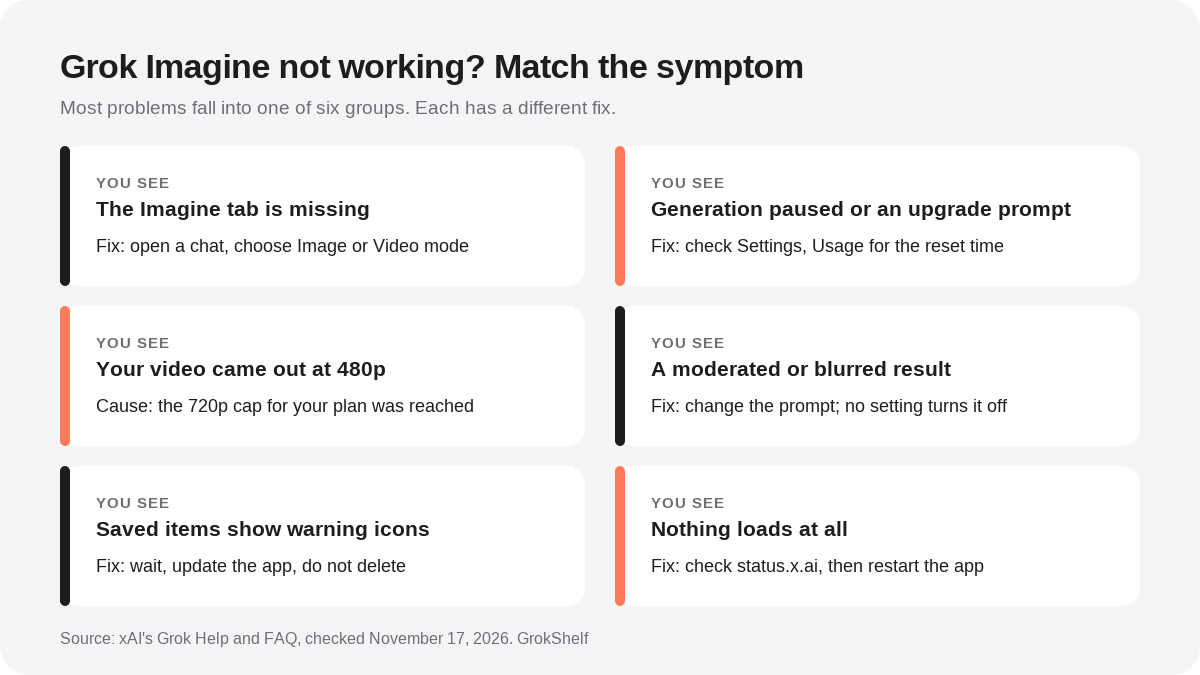
| What you see | Most likely cause | What to do |
|---|---|---|
| The Imagine tab is missing, or grok.com/imagine opens a chat | Imagine moved into Grok on November 14, 2026 | Open a chat and choose Image or Video mode |
| Creation stops with an upgrade or limit message | Your weekly usage pool is used up | Check Settings, Usage for the reset time |
| A video came out at 480p instead of 720p | You reached the 720p cap for your plan | Wait for the reset or move to a higher plan |
| The result is moderated or blurred | The request did not pass a content policy check | Change the prompt; no setting turns this off |
| Saved items show warning icons | Library loading problems since the move | Wait, update the app and do not delete anything |
| Nothing loads or every request fails | An outage, or an app or browser problem | Check status.x.ai, then restart the app |
| You pay but still get upgrade prompts | You are signed in with a different account | Sign in the way you subscribed |
The Imagine tab is gone
This is the most common report since mid November, and it is not a fault. On November 12 and 13, many accounts lost the separate Imagine tab. On November 14 the Grok Imagine account on X confirmed that image and video creation now lives in Grok itself. The whole story, with dates and sources, is in Grok Imagine is now part of Grok.
To create now, open a normal chat on grok.com or in the Grok app, choose Image or Video mode in the chat box, then type your prompt. Old bookmarks to grok.com/imagine open the chat with that mode already selected. If you still see the old layout, or neither mode shows up, update the app first. xAI's FAQ also recommends using grok.com in a standard Chrome or Chromium browser, because some users on grok.x.ai or other addresses miss features.
Check whether Grok is down
If nothing loads, or every request fails with a server error, check xAI's status page at status.x.ai before you change anything on your side. Outage trackers such as Downdetector count user reports, so a spike there means many people are having trouble, not that xAI has confirmed an outage. If there is an incident, wait for it to clear and try again. Reinstalling the app will not fix a problem on xAI's side.
Grok Bot is a separate product with its own troubleshooting steps. If that is what stopped working, see Is Grok Bot down?.
You ran out of usage
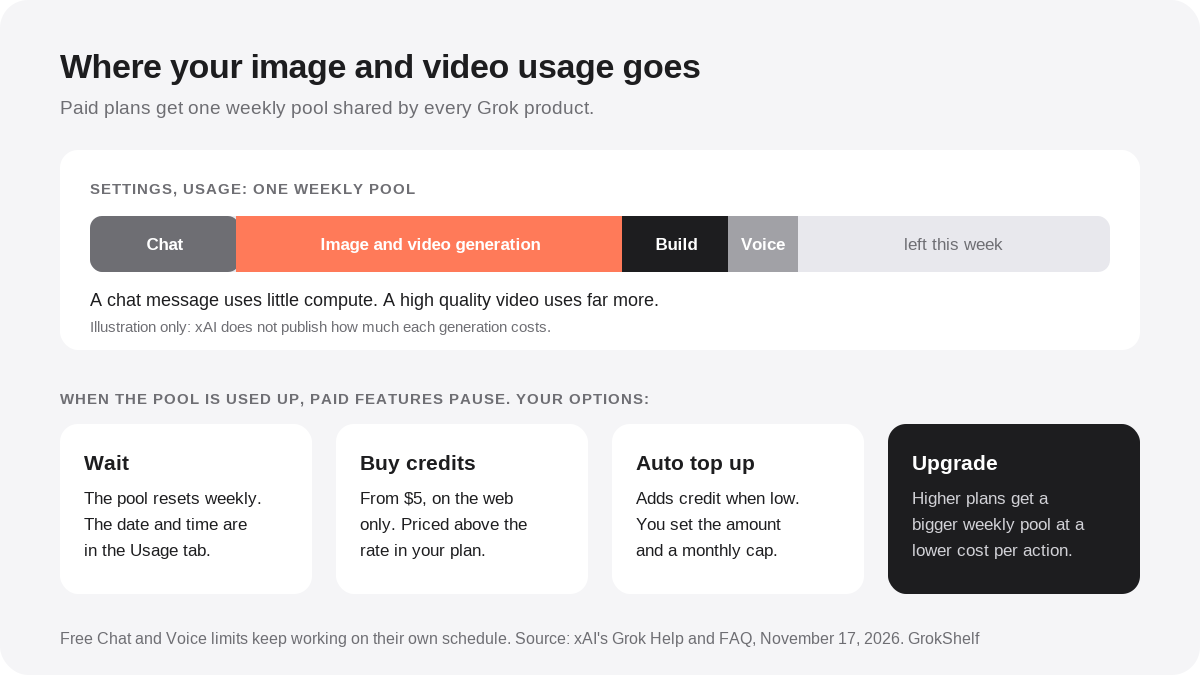
On paid plans, Grok no longer gives each product its own daily limit. According to xAI's FAQ, it uses one shared weekly usage pool that you can spend across Chat, image and video generation, Voice, Build and the API in any mix. xAI says the old daily limits often meant running out of image and video generation while chat still had room. The new pool lets you spend more of your allowance on the product you actually use.
Different products use the pool at different rates. In xAI's words, a chat message uses little compute, while a high quality video or a long coding task uses far more. So a few long videos can use up a week of allowance much faster than a day of chatting. xAI does not publish how much each image or video costs.
To see where you stand, open Settings, then Usage, on the web or in the mobile app. It shows a progress bar, a breakdown by product, your weekly reset date and time, and any extra usage credits you hold. If image and video generation takes most of the bar, that explains the pause.
What happens at the limit
When the weekly pool runs out, paid features pause until it resets. You keep Grok's free tier limits on Chat and Voice, which run on their own schedule, but image and video creation stops. xAI lists three ways to continue before the reset:
- Buy extra usage credits from the Usage tab. The minimum is $5, and for now credits can only be bought on the web, not in the mobile apps. They cost more per action than the usage included in your plan.
- Turn on automatic top ups, with an amount and a monthly cap you choose, so credit is added when your balance runs low.
- Upgrade to a higher plan. xAI says that if you keep running out, a bigger plan gives more weekly usage at a lower cost per action than buying credits again and again.
Is Grok Imagine still free?
xAI has not published a clear answer. Its pricing page for The X Subscription lists the Free plan's included usage only as "Limited", and the FAQ mentions free tier limits only for Chat and Voice. Neither says whether a free account can make images or videos, or how many.
Outside reports do not agree either. Several 2026 guides say free image and video generation ended earlier this year, while at least one says free accounts got a small daily image allowance back in October. Treat any exact number you see online as unconfirmed. The reliable check is your own account: try Image mode, and look at Settings, Usage. Paid plans start at $8 a month for Plus, and every plan is compared in our Grok pricing guide.
Your video came out at 480p
This one is documented. xAI's FAQ says 720p videos automatically fall back to 480p once you reach the 720p cap for your plan. Your video was not damaged and your prompt was fine. You used up the higher resolution allowance for now.
To get 720p again, wait for your usage to reset or move to a higher plan. xAI does not publish the size of the 720p cap for each plan.
Your result was moderated
xAI's developer docs say generated media is subject to content policy review. When a request does not pass, you get a moderation notice or a blurred result instead of the picture or video you asked for. There is no setting that switches the review off, and xAI does not publish a list of the words or subjects that trigger it.
If your request was harmless, rewrite it in plain, specific terms and try again. Describe the scene you want rather than leaning on names. Requests involving real people, other people's characters or brands, and sexual or violent content are the areas AI image tools most often restrict, so leave those out if they are not essential. If the same harmless prompt keeps getting blocked, send feedback from Help in the app. That is more useful than many near identical retries, which also use up your weekly pool.
We do not cover ways around moderation. They break xAI's Acceptable Use Policy and can put your account at risk.
Saved images and videos are missing
Since the November move, some users have seen warning triangles where saved items used to be, most often in Chrome. In the cases we followed, many items came back on their own within hours. Your creations are stored with your account, so do not delete anything while this settles. Avoid refreshing a half loaded Library page over and over, which can make it look as if more has gone.
Update the app, then check your Library on both the web and your phone. Be careful on grok.com/files: xAI's FAQ describes it as the place to delete content and free up space, so it is not the place to experiment. If items are still missing after a day, contact support with the dates you made them.
The watermark will not go away
This is by design. xAI's FAQ says generated images and videos include a Grok watermark to show the content was made with AI, there is no setting to remove it, and some countries require AI content to be labelled. Removing, changing or hiding the watermark is against xAI's Acceptable Use Policy.
Fix app and browser problems
If Grok is up and you are not near a limit, the problem is usually on your device. xAI's FAQ recommends these steps, in roughly this order:
- Update the Grok app to the latest version.
- Fully close the app and open it again, or delete and reinstall it.
- Log out, clear the cache and log back in.
- On the web, use grok.com in Chrome or Edge. Try a private window to rule out a browser extension.
You pay but still get upgrade prompts
If your plan shows as active but Grok keeps asking you to upgrade, xAI's FAQ says the restart, log out and clear cache steps above fix most of these mismatches. Check that the subscription is active both in the app and in your app store's subscription list.
The other common cause is signing in a different way from how you paid. If you subscribed through Apple with a Hide My Email address, you must use Sign in with Apple for the plan to be recognised. If your plan comes from X, link it on grok.com under Settings, Account, using Connect your X Account. Sign in methods are managed at accounts.x.ai, and our Grok login guide covers the rest.
When to contact support
Contact support from Help in the Grok app or on grok.com when the status page is clear, the steps above have not helped, or items stay missing for more than a day. Say what you were making, which mode you used, the exact message you saw, your app version and device, and roughly when it happened. A screenshot of the message and of Settings, Usage saves a lot of back and forth.
Common questions
Has Grok Imagine been shut down? No. It moved into the main Grok chat on November 14, 2026, and xAI has announced no shutdown. Reports of team cuts are covered in Grok Imagine after the layoffs.
When does my image and video limit reset? On paid plans it is part of the weekly pool. Settings, Usage shows the exact reset date and time for your account.
Do images and videos use the same allowance as chat? On paid plans, yes. Everything draws from one weekly pool, but video uses far more of it than a chat message.
Can I turn moderation off? No. There is no setting for it, and the content policy review applies to every generation.
Before adding any of these, read Using a Grok Bot safely.
References
- xAI docs: Grok Help & FAQ — weekly usage, credits, 480p fallback, watermark and app fixes, checked November 17, 2026
- xAI docs: The X Subscription usage limits — how the shared weekly pool works
- xAI docs: The X Subscription pricing — plans and included usage
- xAI developer docs: Image & Video — content policy review of generated media
- Grok Imagine on X: creation now live in Grok — November 14, 2026