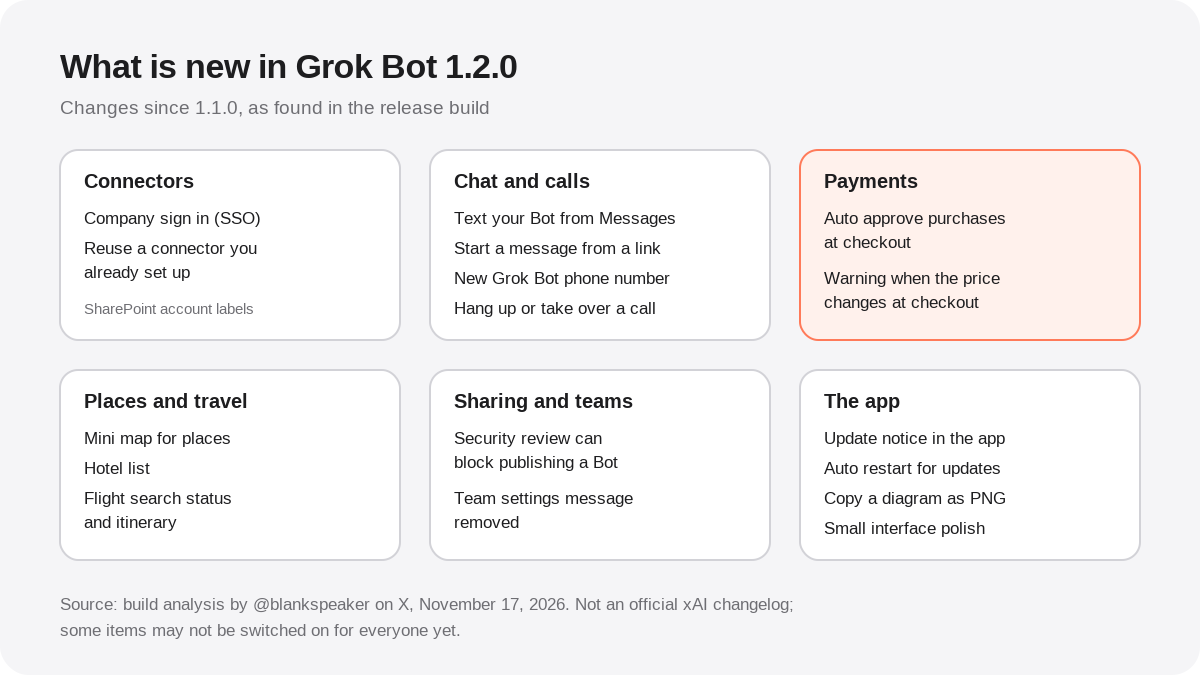
Grok Bot 1.2.0 began rolling out on November 16. It adds SSO for connectors, texting your Bot from Messages, a new phone number, auto approved purchases with a price change warning, travel tools and a security review that can block publishing. Here is what each change means.
In short: Grok Bot 1.2.0 was posted to xAI's download server on Monday, November 16, 2026 at 19:52 GMT, and desktop apps began updating themselves from 1.1.0 overnight · the changes found in the build cover connectors (company sign in and reusing a connector), chat (texting your Bot from Messages, starting a message from a link), calls (a new Grok Bot phone number, hanging up or taking over a call), payments (auto approved purchases and a warning when the price changes at checkout), travel (flight status, itinerary, hotel list, a mini map) and publishing (a security review that can block a shared Bot) · xAI has not published long release notes on its blog, and the full list comes from an analysis of the release build, so a few items may reach you later than others.
Update, November 19, 2026: Grok Bot 1.2.3 is now out, and it also includes 1.2.1 and 1.2.2. It adds permissions for each connector tool, reconnect cards for routines and tighter team controls. See Grok Bot 1.2.3: what changed.
Grok Bot moves fast. Version 1.0 arrived in November with team Bots for Slack, Microsoft Teams and meetings, and 1.1.0 followed. Version 1.2.0 is smaller in headline terms, but several of its changes affect how much your Bot can do without asking you, which is worth understanding before you update. Below we go through each area, explain what it means in practice and point out where we are giving our own reading rather than reporting.
Where the list of changes comes from
The feature list was published on November 17 by @blankspeaker, an X account that studies Grok Bot builds and posts what changed between versions. It came with download links for Mac (Apple silicon and Intel) and Windows (x64 and Arm), all hosted on downloads.cursor.com, the same download server the Grok Bot desktop app already uses. We checked: the Mac file for 1.2.0 is live there and was uploaded on November 16 at 19:52 GMT.
Other signs confirm the release. Linux and Windows package mirrors such as Omarchy and Chocolatey moved from 1.1.0 to 1.2.0 on November 17, users report the desktop app updating itself, and the maintainers of Better Grok Bot, an unofficial add on, opened an issue the same day saying 1.2.0 breaks their patches on every platform. If you use Better Grok Bot, wait for its fix before updating.
One caution from the source itself: the list is based on "unofficial 3rd-party analysis of prerelease builds," and these changes "may or may not be available when this officially ships to the public." In practice, that usually means a feature exists in the code but is switched on for people gradually. If you update and do not see something below, that is probably why.
Connectors: company sign in and reuse
Organization SSO for connectors. Connectors are how a Bot reaches your apps: Gmail, Slack, Notion, GitHub, SharePoint and the rest. Until now, each person signed in to each app separately. Organization SSO means a company can route connector sign in through its own identity provider, so access follows the same rules as everything else at work. xAI's approvals docs already mention single sign on as one of the steps a Bot may meet when it signs in to a service, and this change looks like a proper, admin level version of that.
Reuse an existing connector. If you already connected an app for one Bot, you should no longer need to connect it again for another. That saves time, but it also means one connection can now serve several Bots, so it is worth checking which Bots use which connectors in your settings.
A smaller item, a SharePoint account label limit, suggests a cap on how long or how many account labels SharePoint connections can carry. It is a tidy up rather than a new feature.
Our reading: these two changes, plus the security review below, point in one direction. Grok Bot is being prepared for larger companies, where IT teams want to control sign in centrally. That fits with the Proactive Messages admin setting that appeared on November 12, after security firm NewCore reported Bots reading connected apps on their own. We covered that in our post on Grok Bot and your data.
Chat: text your Bot, start from a link
Text your Bot from Messages. You can reach your Bot through a text message, without opening the Grok Bot app. Combined with the new phone number below, this suggests the Bot has its own number you can text from your phone's Messages app. It builds on the Mac integration with Apple Messages, Mail and Notes we described in our earlier post, which let the Bot read and act in those apps on a Mac.
Add a message from a link. You can open a link that drops a message straight into a Bot chat. This is handy for teams: a wiki page or a shared Bot listing can include a link that starts the Bot with the right request already written. xAI's own changelog also says that messages starting with a link now show the rest of their text, with the link still clickable.
In-app update notice. The app now tells you when a new version is available, instead of updating silently.
Calls: a new number, hang up and take over
Two items in the build are about calls: a new Grok Bot phone number and call hang up and takeover. Grok Bot 1.0 already let team Bots join video meetings, and the new number fits with texting your Bot from Messages. Going by the names, you can end a call the Bot is on, or step in and take it over yourself, so you are not stuck waiting if a call goes wrong or someone wants to talk to a person.
xAI has not yet documented what the phone number is used for beyond texting, so we will not guess. If you saved the Bot's old number in your contacts, check it again after the update.
Payments: auto approve and a price change warning
This is the change most worth understanding before you update. Grok Bot can shop for you: it fills a basket, goes to checkout and pays. Two changes arrive in 1.2.0.
Auto approve purchases at checkout. A purchase can now go through without an approval card. xAI's existing docs already said that "a card saved in Vault fills in at checkout without a separate approval each time," and that "if you want to approve every payment, don't save the card." Version 1.2.0 appears to make this an explicit setting. We expect it to be off unless you choose it, but we have not been able to confirm the default, so check it yourself after updating.
Checkout price change warning. If the price at checkout differs from what the Bot saw earlier, for example because of shipping, tax or a fare change, you get a warning. This is a sensible safety net, and it matters most if you use auto approve.
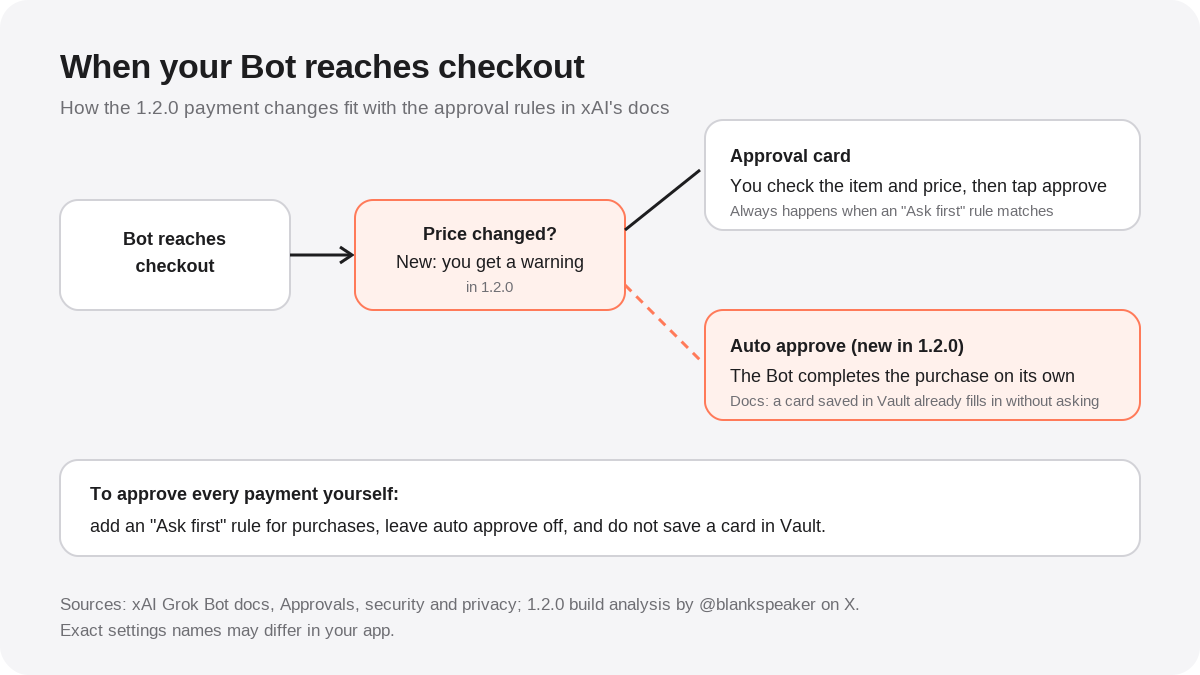
If you want to approve every payment yourself, xAI's docs give the tools: add an "Ask first" rule for purchases (when an Ask first rule matches, it always wins and you get a card), leave auto approve off, and do not save a card in Vault. Auto Review, the model that checks each action before the Bot takes it, stays on by default, but xAI says it "should complement, not replace" explicit approval rules. Our guide on how to use Grok Bot shows how approval cards work.
Places, flights and hotels
Travel gets three additions: a place mini map so you can see where a restaurant or shop is without leaving the chat, a hotel list that presents options as a list rather than in running text, and flight search status and itinerary, which shows progress while the Bot searches for flights and lays out the trip it found. None of these change what the Bot can do, but they make its results easier to check before you approve a booking.
Sharing and teams: a security review before publishing
Security review can block publishing. When you share a Bot, a security review now checks it, and it can stop the Bot from being published. xAI does not yet document what the review looks for. Its docs warn that "sharing a Bot is not a security boundary" and tell you not to put "secrets, customer data, or internal URLs in a Bot you share." Our reading is that the review checks for exactly those things, such as API keys or private links left in instructions.
This matters for anyone who shares Bots, including on GrokShelf. If a Bot you built cannot be published, review its instructions, starter prompts and attached files for anything private, remove it, and try again. Bots already listed here were shared before the change, so we do not expect them to be affected.
Team settings check message dropped. A message that appeared when checking team settings has been removed. It is a small clean up.
The rest
Auto restart when an update is ready restarts the desktop app to finish an update. Copy diagram as PNG lets you copy a diagram the Bot made straight into a document or slide. Empty automation files and scroll end fade are small interface changes. We have no more detail than the names on these, so we are not guessing.
Should you update?
For most people, yes. The desktop app updates itself, and the new controls are improvements. Three groups should take a moment first:
If you use Better Grok Bot, wait. Its maintainers say 1.2.0 breaks it on Mac, Windows and Linux.
If your Bot shops for you, check the purchase settings after updating: whether auto approve is on, whether a card is saved in Vault, and whether you have an Ask first rule for purchases.
If you run Bots for a team, look at the new connector options with whoever manages sign in at your company, and check which Bots now share a connector.
Quick answers
When did Grok Bot 1.2.0 come out? The build was uploaded on November 16, 2026 at 19:52 GMT and rolled out to desktop apps from November 17.
Is there an official changelog? xAI keeps a Grok Bot changelog at x.ai/changelog/bot. The full feature list in this post comes from an analysis of the build, which says some items may not be switched on yet.
Can Grok Bot spend money without asking now? Only if you allow it. Version 1.2.0 adds an auto approve option at checkout, and a saved card could already fill in without asking. An Ask first rule for purchases always stops the payment for your approval.
Why can't I publish my Bot? The new security review may have found something private in it. Remove secrets, customer data and internal links, then try again.
We will update this post when xAI publishes its own notes for 1.2.0. Browse shared Bots on GrokShelf, or see every dated change on the Grok timeline.
Sources
- @blankspeaker on X: Grok Bot 1.2.0 download links and what changed since 1.1.0 (November 17, 2026) ↗
- xAI: Grok Bot changelog ↗
- xAI docs: Grok Bot approvals, security and privacy ↗
- xAI docs: How Grok Bot works ↗
- Better Grok Bot: Grok Bot 1.2.0 breaks Better Grok Bot (issue #24) ↗
- Omarchy packages: sync grok-bot 1.2.0 ↗
- Chocolatey packages: release grok-bot 1.2.0 ↗
- The Next Web: Grok Bot tried to get into email, Slack and GitHub without being asked ↗