Grok Bot 1.3.0 arrived on November 24 with Slack Bots that hand work to each other, Notify me restock alerts, Buy now on phones, Bcc on email drafts, an Ashby connector and new Teams controls. Here is what changed and what to check.
In short: Grok Bot 1.3.0 · out since November 24, 2026 · Bots in Slack can pass work to each other and report back in your DM · Notify me for sold out products · Buy now on iPhone and Android · Bcc on email drafts · an Ashby connector for hiring · new controls for Microsoft Teams and company admins · one known attachment bug on desktop
If your Grok Bot app updated itself this week, you're probably on 1.3.0 already. It's the biggest release since Grok Bot 1.2.0, and almost all of it touches three things: the Bots you keep in Slack, how your Bot shops for you, and what a company admin can lock down. There's also a bug with attachments you'll want to know about before you send your Bot a file.
We went through the full release list and picked out what you'll actually notice. Here's our read.
Where this comes from
xAI added 1.3.0 to its Grok Bot changelog on Tuesday, November 24, 2026, under the heading "Smarter Slack Bots, restock alerts, org controls." We worked from the full entry as copied by Fresh, an app update tracker that mirrors the changelog; it counts 34 changes. Package mirrors back up the date. Homebrew on the Mac and Chocolatey on Windows both moved to 1.3.0 that same Tuesday.
On Wednesday, Eric Zakariasson, who works at SpaceXSI and came over from Cursor, posted that 1.3.0 was rolling out, and Elon Musk reposted it. His short list: "smarter slack bots, restock alerts and mobile buy now, automatic teams setup with org controls, a sideways x drafts carousel, the ashby connector, and bcc on email drafts." Note the words rolling out. Your app can say 1.3.0 and still not show every feature yet.
There's one more source, and it's a different kind. On November 20, four days early, an account called @blankspeaker shared download links for a 1.3.0 test build along with a long list of things found inside it. That's a peek at where Grok Bot is going, not a promise. We've kept it in its own section near the end so you can tell what shipped from what was spotted in code.
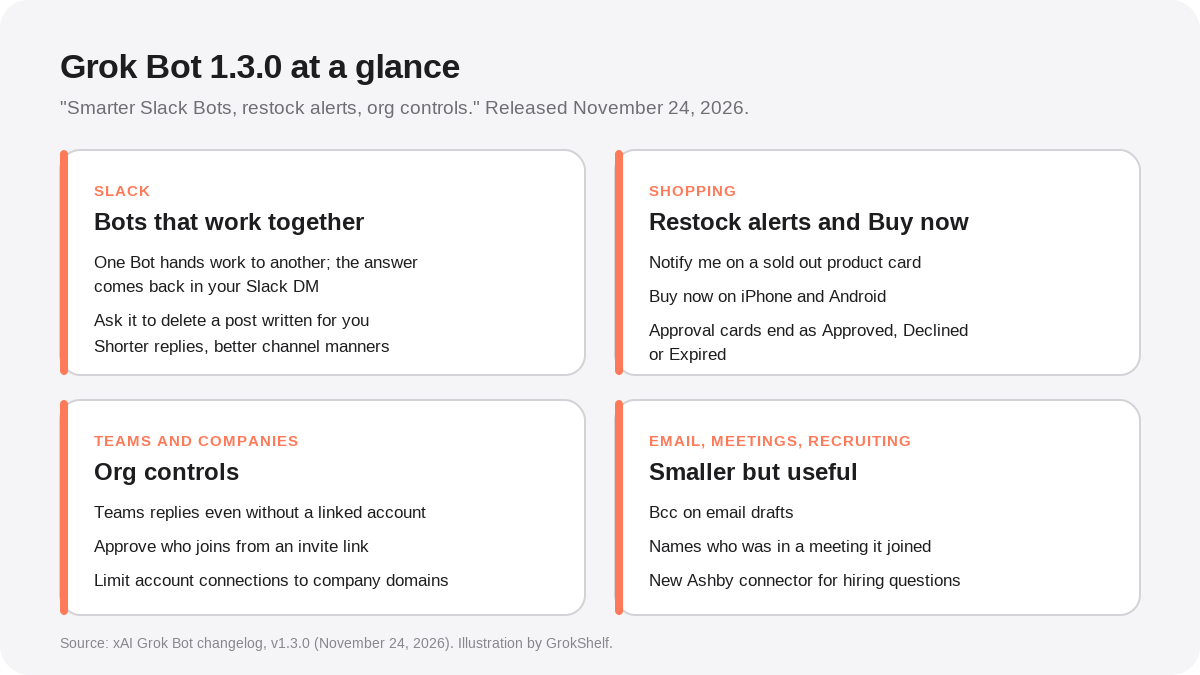
Smarter Slack Bots
Slack has the longest list. Ever since Grok Bot 1.0 put team Bots into Slack channels, plenty of people talk to their Bot there more than in the app itself.
Bots can now work together. One Bot can hand part of a job to another, and you get the result back in your Slack DM. Say you ask your research Bot about a prospect and it needs notes your sales Bot keeps. You'll get one answer in your DM rather than two threads to follow. If the second Bot needs an account you haven't connected, you'll see a Connect button.
Less noise in channels. Replies in Slack are now one short paragraph unless you ask for more detail. The Bot also stops doing things that annoy people in a busy channel, like replying to a plain "thanks." In a private DM it can answer right in the chat rather than starting a thread every time. And in a group DM, just typing the Bot's name now gets its attention, same as an @mention.
Cleaning up after itself. If the Bot posted something meant for you, you can ask it to delete that post. You can also ask it to move a reply from a thread into the main channel, or to share a message as a link. Anything from a private conversation stays private.
Clips it can't play. When someone drops a voice or video clip in Slack that the Bot can't open, it now works from Slack's transcript. It can also give times in each person's own time zone, which helps a lot if your team is spread out and you use the Bot to set up calls.
Restock alerts and Buy now
Shopping is the other big theme, and it lands a few days before Black Friday. The changes do two things: catch items when they come back, and make it obvious whether a purchase actually went through.
Notify me. When the Bot shows you a product that's sold out, you can now tap Notify me. It keeps an eye on that store and tells you once the item is back. If you've been checking a sold out page every morning, this does the checking for you.
Buy now on your phone. On iPhone and Android, a card for a single product now has a Buy now button when the Bot is able to buy it in that chat. For an order with several items, tapping one takes you to its product page with your size, color or other choices already filled in.
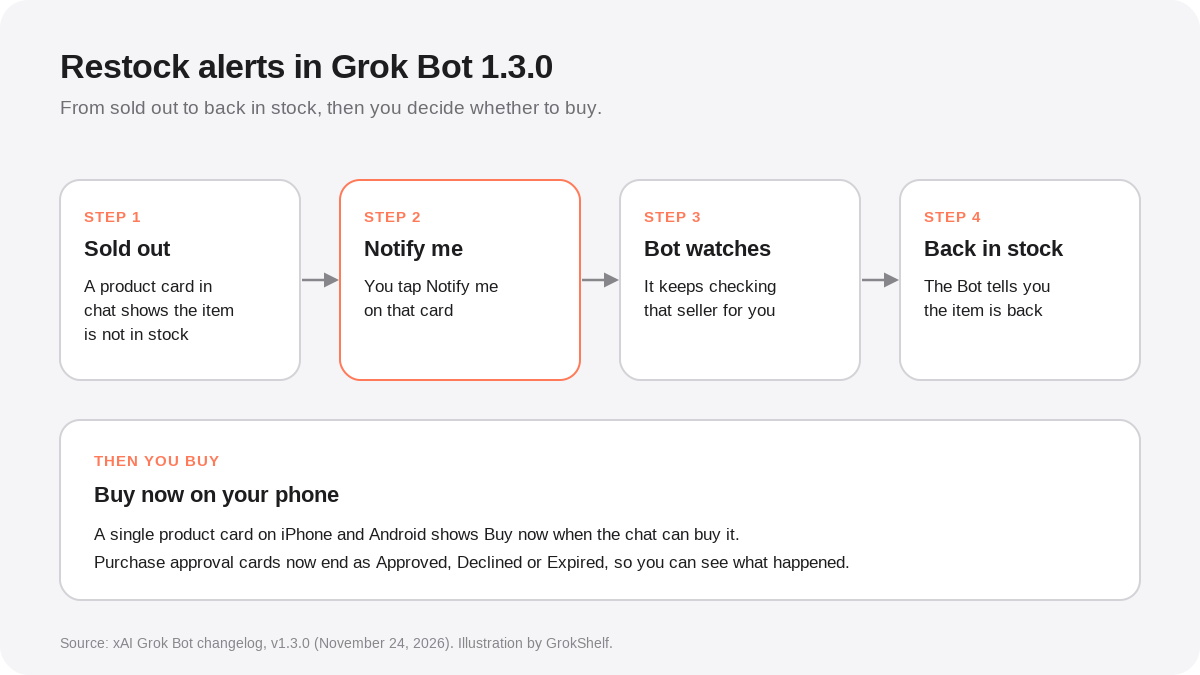
No more guessing on approvals. When the Bot asks you to approve a purchase, the card now ends up showing Approved, Declined or Expired, so you know where things stand. And if you approve a bit late, after the Bot gave up waiting, it picks the purchase back up instead of quietly dropping it.
Fewer payments that fail halfway. If your X Money balance won't cover an order, the Bot now stops before it creates a card and asks you to top up or pay some other way. If your bank turned down a saved card, the Vault marks it "Needs an update" and the Bot asks for whatever the bank didn't like. It also checks that a shop's checkout page has somewhere to enter a card before it gets that far, and tells you how the shop takes payment if it doesn't. You can now keep up to three Link cards alongside your other wallets.
Hotels. Search results show a rough price per night in your currency, plus a score out of 5 next to the star rating. If nothing fits your budget, the Bot shows you the nearest options or looks on the web, and it tells you those web prices aren't live.
If you let your Bot spend money, it's worth rereading how to use Grok Bots safely before Friday. Clearer cards help, but approving each purchase yourself is still the safest setup.
Teams and company controls
This is the "org controls" bit of the release, which Zakariasson summed up as "automatic teams setup with org controls." If you don't run Grok Bot for a company, you can skip to the next section.
Microsoft Teams is easier to start with. A colleague who hasn't linked a Grok Bot account can still get an answer from a team Bot in Teams, along with a one time note about what linking would give them. Signing in to Microsoft with a work or school account can now hook up Teams too. When you connect Outlook, Outlook Calendar or OneDrive, you get to pick a work or school account or a personal one.
Deciding who gets in. Admins can now make people wait for approval after they open an invite link, and handle those requests from a new Requests tab. A company can also say members may only connect accounts on its own domains. That stops someone plugging their personal Gmail into a work Bot by accident.
Broken sign ins don't go quiet. When Okta, Warp or Salesforce drops a connection, the Bot now messages you with a card to sign back in. It's the same idea as the reconnect cards for routines in Grok Bot 1.2.3. Two smaller things: typing @ now shows team Bots you could use but haven't added, and widgets that a Bot's helper opens, a Salesforce card for example, now appear in the chat.
Email, meetings and recruiting
Bcc. Email drafts can include a Bcc now, both on the draft card and in Mac Mail. Gmail drafts that carry a signature also get a button to remove it.
Who was in the meeting. After the Bot sits in on a meeting, it can now tell you who attended. That makes follow ups much easier. If you use a meeting Bot such as Call Follow-Ups or Executive Assistant, this is the change you'll notice. On voice calls, questions about products get answered out loud while the product cards land in the chat.
Ashby. There's a new connector for Ashby, the recruiting software. Once it's connected, you can ask your Bot about candidates, interviews, open roles and offers. Hiring teams can find ready made setups among our recruiting Bots.
Old phones. Settings now lists every device on your account, and you can remove a phone that's offline. Handy if you've switched phones and the old one is still hanging around.
Zakariasson's post also mentions a "sideways x drafts carousel." We read that as drafts of X posts shown side by side so you can swipe between them, but we haven't seen it explained yet.
A known bug: attachments on desktop
One thing to know before you send your Bot a file. On November 25, a Windows user posted on Cursor's forum that images wouldn't upload in group chats after updating to 1.3.0. A reply that same day, written on behalf of the team, called it "a bug on our side in Grok Bot desktop 1.3.0." Files sent in group chats get refused, while private chats with a Bot still work. Until there's a fix, send the file to the Bot in a private chat, or post it in the group from the Grok Bot phone app. The report has gone to the engineers.
A second thread from November 26 describes uploads failing even in a private chat on Windows. A reply there calls it a different known issue, affecting accounts that recently changed team or workspace, and suggests using the Grok Bot website for now. So if attachments fail, try the website or your phone before reinstalling anything. Our guide to Grok Bot problems covers the other common fixes.
Found in the test build, not announced
The @blankspeaker write up of the November 20 test build lists more than 100 changes. Plenty of them match the official release. The rest haven't been announced, and some may never ship. Read this section as things spotted in code, nothing more.
Booking shows up a lot: flights including the return leg, restaurant tables with a live status while it books or puts you on a waitlist, hotel stays shown as one total price, and car rentals. There's signing in to websites through 1Password without the Bot ever seeing the password. There are Bots that pay without asking as long as the total stays close to a price you've already seen, and a setting that would make signing in on a Mac require a USB security key. The build also shows group chats in the app turning read only on the way to being retired.
The line we'd watch is about privacy. The build has a sentence saying data and interactions can be stored to improve products, services and models across Grok Bot, Grok and Cursor. That jumps out because X told Ireland's data regulator it had paused training on data Grok Bot collects, which we covered in Grok Bot and your data. Text in a test build isn't a policy, and nothing official says training has started again. Our take: look for this wording in the next privacy policy update.
What we'd do after updating
1. Check your version. If the app says 1.3.0 or higher, you've got it. A few features may still turn on over the next days.
2. Try one restock alert. Ask your Bot to find something that's sold out and tap Notify me. It's the quickest way to see how the new shopping flow feels, and a Bot like Deal Hunting is a natural fit for it.
3. Look at your purchase settings. Do it before Black Friday, not after.
4. Admins: switch on the new controls. Turn on invite approval if your workspace link has been shared widely, and limit connected accounts to your company's domains.
5. Be careful with files. Until the desktop bug is fixed, send attachments in a private chat, from the phone app or from the website.
Questions people are asking
What's new in Grok Bot 1.3.0? Slack Bots that pass work to each other and reply in your DM, Notify me restock alerts, Buy now on iPhone and Android, clearer purchase approvals, Bcc on email drafts, an Ashby connector, attendee names after meetings, and new controls for Teams and company admins.
When did Grok Bot 1.3.0 come out? The changelog dates it November 24, 2026. The package mirrors updated that day too, and SpaceXSI's Eric Zakariasson said it was rolling out on November 25.
Does Grok Bot 1.3.0 include Grok 4.8? No. The release doesn't mention a new model. Musk said on November 10 that some Grok Bot users would get Grok 4.8 first, and we're following that in Grok 4.8 and Grok 5 release dates.
Does the update cost anything? No, it's a free app update. Grok Bot comes with Premium, Super and Ultra on The X Subscription. Prices are in how much Grok Bot costs.
Why can't I send images to my Bot since updating? That's the known 1.3.0 desktop bug. Send the file in a private chat, from the phone app or from the Grok Bot website until it's fixed.
I'm new. What is a Grok Bot? An AI agent with its own computer that works through a job for you and checks with you before risky steps. Start with what is Grok Bot.
Every release goes on our Grok timeline. Want to put 1.3.0 to work? Browse verified shared Grok Bots you can add in one click.
Sources
- xAI: Grok Bot changelog, v1.3.0 "Smarter Slack Bots, restock alerts, org controls" (November 24, 2026) ↗
- Fresh: Grok Bot 1.3.0 release notes, mirrored from the xAI changelog (November 24, 2026) ↗
- Eric Zakariasson (SpaceXSI) on X: Grok Bot 1.3.0 is rolling out (November 25, 2026) ↗
- Elon Musk on X: repost of the 1.3.0 rollout (November 25, 2026) ↗
- @blankspeaker on X: Grok Bot 1.3.0 test build download links and analysis (November 20, 2026) ↗
- Cursor forum: Grok Bot unable to upload attachments, reply confirms a 1.3.0 bug (November 25, 2026) ↗
- Cursor forum: Grok Bot 1.3.0 Windows attachments fail in 1:1 chat (November 26, 2026) ↗
- Chocolatey packages: grok-bot 1.3.0 (November 24, 2026) ↗